What is Cable Broadband? (Definition & How It Works)
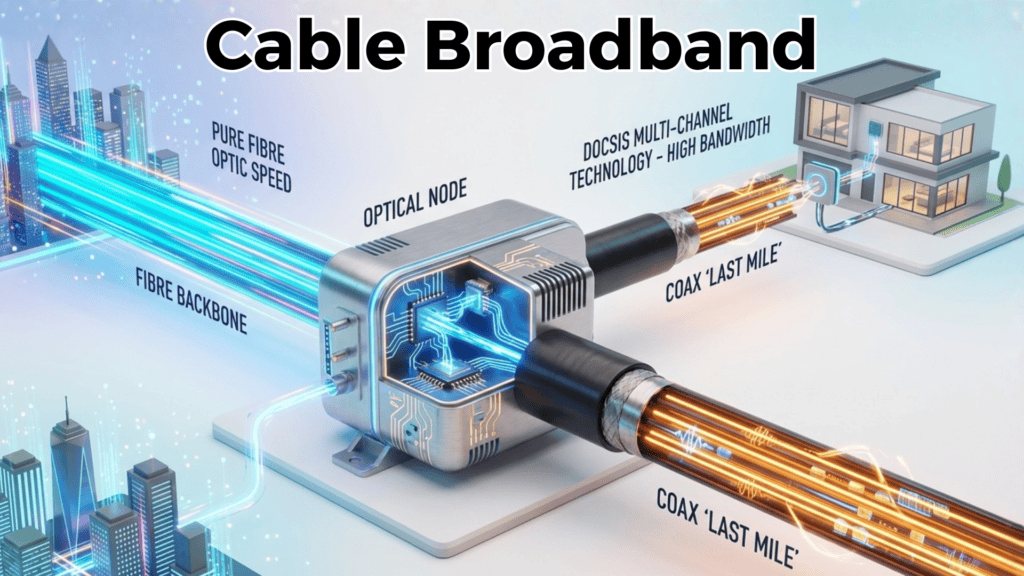
Cable broadband technology delivers internet to your home through the same hybrid fibre-coaxial (HFC) infrastructure that has powered television for decades. Unlike FTTP broadband, which uses fibre-optic cable all the way to your premises, cable broadband uses a two-tier architecture: a high-speed fibre backbone running down your street, then switches to copper coaxial cable for the final connection into your home. This mixed approach allows cable to deliver speeds ranging from 60 Mbps to 1,130 Mbps on current DOCSIS 3.1 technology, with multi-gigabit symmetrical speeds arriving as DOCSIS 4.0 networks roll out across the UK.1
The primary advantage of this architecture is cost-efficiency. Cable operators don’t need to replace existing infrastructure; they upgrade what’s already there. Virgin Media, the UK’s largest cable provider, operates within this framework and currently reaches approximately 60% of UK premises—roughly 18.3 million homes. In areas where cable is available, it often competes directly with FTTP for speed leadership, though the technology remains fundamentally different in how data flows upstream and downstream.
For a complete overview of all broadband technologies, see our Broadband Fundamentals: The Complete UK Guide for 2025.
Cable vs Fibre: Understanding HFC Infrastructure
The distinction between cable and fibre fundamentally comes down to the “last mile”—the final connection from the street cabinet to your home. FTTP technology replaces copper entirely with fibre-optic glass, which carries data via light pulses. Cable infrastructure stops short, using fibre up to a street amplifier (the “node”), then transitioning to coaxial copper cable for the remaining distance to your property.
Coaxial cable—the same technology used in TV transmission—can carry very high-frequency signals without significant degradation over medium distances. However, it is more susceptible to electromagnetic interference than fibre and is inherently a shared resource. When Virgin Media advertises 132 Mbps (M125 package), that speed is typically available to you individually, but the backbone carrying traffic from all homes in your node must accommodate collective usage. During peak evening hours (7–9 PM), when multiple households stream video simultaneously, available bandwidth can degrade because the shared upstream and downstream channels experience higher contention.

FTTP, by contrast, assigns you a dedicated fibre pair running back to the exchange. This dedicated architecture explains why FTTP maintains consistent speeds during peak hours, while cable users may experience 25–50% slowdowns during busy periods in areas with high adoption.
The infrastructure difference also shapes cost. Virgin Media’s existing coaxial network required minimal civil engineering to upgrade from historical 50 Mbps to current gigabit speeds. Deploying new FTTP requires digging trenches, installing fibre conduit, and building new local exchanges—work that takes years and billions in investment. This economic reality explains why Virgin Media’s gigabit service (Gig1: 1.1 Gbps for £24.99/month) is cheaper than many FTTP providers’ entry-level 150 Mbps packages.
How DOCSIS Technology Works (Data Over Cable Service Interface Specification)
DOCSIS is the technical standard governing all cable broadband transmission. Think of it as the “rulebook” that defines how data packets flow over coaxial cable, how speeds scale, and how the shared network allocates bandwidth. Every incremental version of DOCSIS has unlocked faster speeds by using wider frequency bands and smarter signal modulation.
The DOCSIS standard works by dividing the radio-frequency (RF) spectrum into discrete channels. DOCSIS 3.1, the current backbone technology deployed by Virgin Media, allocates:
- Downstream (your download direction): 32 channels × 6 MHz (plus wider OFDM channels) = theoretical maximum 10 Gbps
- Upstream (your upload direction): 8 channels × 6.4 MHz = theoretical maximum 1 Gbps
In real-world deployment, Virgin Media doesn’t activate all channels simultaneously on every customer. Instead, they provision based on package tier. A customer on the M500 package (516 Mbps down) uses a subset of those channels, while Gig1 (1.1 Gbps) uses more. This tiering is why real-world speeds align closely with advertised rates—ISP testing shows Virgin Media customers achieve speeds just 1% slower than advertised, well above industry average.
The crucial detail for understanding cable’s upload weakness: the upstream channels are physically narrower and fewer in number than downstream channels. A coaxial cable bundle reserved for upstream signals occupies a lower frequency range (5–65 MHz) to avoid interference with television signals in higher frequency bands. This physical constraint is why cable broadband has historically capped uploads at 35–52 Mbps on DOCSIS 3.1, even when downloads reach 1,100 Mbps. You’re essentially funnelling traffic through bottleneck pipes. 2 3
DOCSIS 3.0 vs DOCSIS 3.1 vs DOCSIS 4.0: Evolution Explained
DOCSIS 3.0 was the technology standard from 2006–2013. It enabled speeds up to 1,216 Mbps downstream but used older modulation (QAM). Its limitation: upload speeds capped at 216 Mbps shared across all users on a given node. No consumer in the UK currently relies on pure DOCSIS 3.0; Virgin Media upgraded entirely to 3.1 years ago.
DOCSIS 3.1 arrived in 2013 and is Virgin Media’s current standard. It introduced OFDM (Orthogonal Frequency Division Multiplexing) modulation, which treats the coaxial cable like a series of narrower frequency bands, each carrying data independently. This approach is efficient—it can pack more data into the same physical medium. DOCSIS 3.1 theoretical limits are 10 Gbps down / 1 Gbps up, though Virgin Media commercially offers up to 1.1 Gbps down (Gig1) and Gig2 at 2 Gbps down with 200 Mbps up. The company’s 2020 trial achieved 2.2 Gbps downstream and 214 Mbps upstream in a live network test.4
The bottleneck persists: DOCSIS 3.1 still uses the legacy 5–65 MHz upstream band, which cannot accommodate multi-gigabit upload speeds no matter how many channels you activate. This asymmetry is not a software limitation but a fundamental hardware constraint in coaxial networks.
DOCSIS 4.0 is the emerging standard (finalised in 2020, with UK deployments beginning in 2025). It solves the upload problem by utilising an extended spectrum, which expands the upstream frequency range to 85–200 MHz. This wider band allows multiple OFDMA (Orthogonal Frequency Division Multiple Access) upstream channels, theoretically supporting symmetrical 10 Gbps up/down. Real-world UK deployments in 2025 are targeting practical symmetrical gigabit speeds (e.g., 5 Gbps / 5 Gbps), not the extreme theoretical limits.
DOCSIS 4.0 also provides lower latency than 3.1 through Full-Duplex architecture—simultaneous upstream and downstream transmission on the same frequency band without time-sharing. Gaming and professional use cases benefit directly from this reduction.
The catch with DOCSIS 4.0: it requires infrastructure upgrades. Cable operators must:
- Replace or upgrade amplifiers on the network (expensive)
- Install new RF spectrum equipment
- Potentially “node split”—dividing a service area from, say, 200 homes per node into 100 homes per node to reduce contention
Virgin Media has not publicly committed to a DOCSIS 4.0 rollout date in the UK, though the technology exists and is being trialled globally. In the UK context, DOCSIS 3.1 will remain the dominant cable standard through 2026.
Cable Broadband Specifications Explained
Real-World Download & Upload Speeds
Virgin Media’s package tiers explicitly map advertised speeds to real delivered throughput. Here’s what genuine cable customers can expect:
Virgin Media Broadband

Great Speed and Reliability
✅ You crave speed and reliability for streaming/gaming.
✅ Bundling TV/mobile saves you money (especially with Volt).
✅ Future-proofing matters (Gig1/Gig2).
M125 Package (Budget Tier)
- Advertised: 132 Mbps down / 20 Mbps up
- Real-world testing: 130–132 Mbps down / 18–20 Mbps up
- Suitable for: Light streaming (up to 4K single-device), browsing, email, casual video calls
- 4K streaming requirement: 25 Mbps minimum. M125 comfortably handles one 4K stream or three simultaneous HD streams
M250 Package (Mid-Tier)
- Advertised: 264 Mbps down / 25 Mbps up
- Real-world testing: 260–264 Mbps down / 24–26 Mbps up
- Suitable for: HD streaming on multiple devices, working from home with moderate video conferencing, casual content creators
- 4K streaming: Handles two simultaneous 4K streams or six HD streams
M500 Package (High-Speed Tier)
- Advertised: 516 Mbps down / 52 Mbps up
- Real-world testing: 510–516 Mbps down / 50–52 Mbps up
- Suitable for: Heavy streaming households, competitive gamers, 1080p content creators, small businesses
- 4K streaming: Handles four simultaneous 4K streams
- Content creation: 1080p 60fps live streaming supported (requires 6–12 Mbps upload; M500 provides 52 Mbps with headroom)
Gig1 Package (Gigabit Tier)
- Advertised: 1,100 Mbps (1.1 Gbps) down / 104 Mbps up
- Real-world testing: 1,085–1,130 Mbps down / 100–110 Mbps up
- Suitable for: Streaming professionals, gamers streaming to Twitch/YouTube, remote workers in demanding roles, households with 6+ concurrent users
- 4K streaming: Unlimited simultaneous streams (well beyond practical need)
- Content creation: 4K 30fps live streaming supported (requires 10.8–47.2 Mbps upload; Gig1 provides 104 Mbps with substantial headroom)
Gig2 Package (Full Fibre Hybrid, Newest Tier)
- Advertised: 2 Gbps down / 200 Mbps up
- Real-world testing: 1,950–2,000 Mbps down / 195–205 Mbps up
- Suitable for: Ultra-high-end households, commercial applications, professional streaming
- Content creation: 4K 60fps streaming viable (Gig2’s 200 Mbps upload exceeds the 13.5–54 Mbps requirement)
- Note: Gig2 is delivered over a hybrid network—Virgin Media’s new full-fibre lines in overbuild areas combined with existing cable backbone in less competitive regions
Latency & Network Congestion (Peak vs Off-Peak)
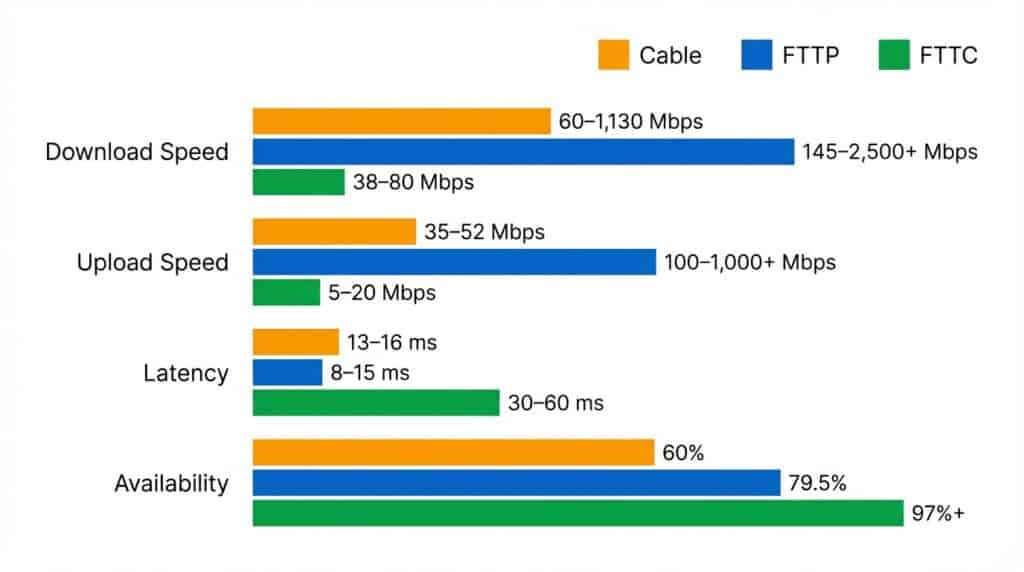
Latency—the time it takes for a signal to travel from your home to the internet and back—is measured in milliseconds (ms). Online games, video calls, and real-time trading applications depend on low latency. FTTP achieves 8–15 ms latency because fibre propagates light pulses at near-speed-of-light (about 2/3 speed of light through glass). Cable, using electrical signals through copper, achieves 13–16 ms average latency, which is acceptable for gaming but slightly higher than fibre.
What matters for cable more than raw latency is consistency. Off-peak (midnight–6 AM), a Virgin Media Gig1 customer will reliably see:
- Download speed: 1,100+ Mbps
- Latency: 13–15 ms
- Jitter (variance): <3 ms
- Packet loss: <0.01%
During peak hours (7–10 PM, weekdays), the same customer may see:
- Download speed: 800–1,000 Mbps (18–27% degradation if their node is contended)
- Latency: 18–25 ms (increased queuing at the shared node)
- Jitter: 5–10 ms (more variance)
- Packet loss: 0.05–0.1% (occasional timeouts)
This degradation happens because a cable node aggregates traffic from 50–200 homes (Virgin Media’s typical node density) into a single upstream connection back to the Internet Exchange. When 30% of those homes are streaming video simultaneously, the shared pipe fills up. Fibre-based operators using point-to-point architecture don’t face this issue—your dedicated fibre pair is reserved for your household alone, regardless of what your neighbours do.5
For casual gaming (console games, Fortnite, Valorant), cable’s 13–16 ms latency is perfectly adequate. Professional esports gamers often prefer FTTP’s 8–10 ms, as the difference translates to fractional-second reaction time advantages in competitive titles. For video calls, latency under 150 ms is imperceptible; cable at 13–16 ms is excellent.
Reliability & Symmetrical Speed with DOCSIS 4.0
Virgin Media reports that its cable network achieves 99.7% uptime, on par with FTTP providers. However, “uptime” refers to complete outages, not speed degradation. Cable’s asymmetrical upload structure (35–52 Mbps on DOCSIS 3.1) remains its core weakness for upload-intensive use cases.
DOCSIS 4.0 addresses this by enabling symmetrical gigabit speeds—e.g., 5 Gbps down and 5 Gbps up on the same connection. This transforms cable from an asymmetric technology into a genuine competitor to FTTP for content creators and professionals. However, widespread DOCSIS 4.0 deployment in the UK remains 18–24 months away as of December 2025, and Virgin Media has not published a UK-specific rollout roadmap.
For now, cable broadband reliability is good for streaming, browsing, gaming, and casual work-from-home. For professional video creation, cloud backup workflows, or team collaboration with large file transfers, FTTP or waiting for DOCSIS 4.0 is preferable.
Contract Terms & Pricing Ranges (UK 2025)
Virgin Media’s standard offering: 24-month contract, no upfront fees, price increases of ~£4/month each April (standard practice across UK ISPs). Current promotional pricing (December 2025):
| Package | Download | Upload | Monthly Cost | Best For |
|---|---|---|---|---|
| M125 | 132 Mbps | 20 Mbps | £18.99–£22.99 | Light streamers, basic browsing |
| M250 | 264 Mbps | 25 Mbps | £24.99 | Moderate streaming, working from home |
| M500 | 516 Mbps | 52 Mbps | £22.99–£27.99 | Heavy streaming, 1080p creation |
| Gig1 | 1,100 Mbps | 104 Mbps | £24.99–£29.99 | Professionals, streamers, multi-user homes |
| Gig2 | 2,000 Mbps | 200 Mbps | £59.99 | Ultra-premium, commercial use |
Note: These prices often include promotional discounts (3 months free, switching credit up to £200). Standard pricing 12–24 months into a contract rises to £26–£65/month depending on tier. Virgin Media also bundles TV and phone services, which can reduce per-service cost for customers wanting multiple services.
Regional cable operators (e.g., Notting Hill Broadband in specific London areas) offer similar speeds at competitive rates but serve only niche postcodes. Availability of non-Virgin alternatives is rare; Virgin Media dominates the UK cable market.
Cable Broadband vs FTTP vs FTTC (Comparison Table)
Side-by-Side Comparison (Speed, Latency, Upload, Availability, Price)
| Metric | Cable (DOCSIS 3.1) | FTTP | FTTC |
|---|---|---|---|
| Download Speed Range | 60–1,130 Mbps | 145–2,500+ Mbps | 38–80 Mbps |
| Upload Speed Range | 35–52 Mbps (asymmetrical) | 100–1,000+ Mbps (symmetrical) | 5–20 Mbps (asymmetrical) |
| Latency (Average) | 13–16 ms | 8–15 ms | 30–60 ms |
| Latency Consistency | Varies peak/off-peak | Consistent all hours | Distance-dependent variance |
| Peak-Hour Performance | 25–50% degradation possible | Full speed maintained | Speed degrades with distance |
| Jitter (Variance) | 5–10 ms (peak hours) | <3 ms | 8–20 ms |
| UK Availability | ~60% (Virgin Media only) | 79.5% (Q3 2025) | 97%+ |
| Entry-Level Price | £18.99–£22.99/month (M125: 132 Mbps) | £25–£35/month (145 Mbps) | £25–£35/month (65 Mbps) |
| Best For | Download-heavy use, gaming, streaming | Content creation, remote work, future-proofing | Budget households, light browsing |
| Infrastructure | Fibre backbone + coaxial last mile | End-to-end fibre | Fibre to cabinet + copper last mile |
| Shared Network? | Yes (50–200 homes per node) | No (dedicated fibre pair) | Yes (shared cabinet) |
| Service Bundling | TV, phone, broadband | Broadband-only typical | Broadband, phone, TV |
When Cable Wins (Urban/Suburban, Bundling, Gaming)
Download Speed Leadership: Cable’s 1,130 Mbps on Gig1 matches FTTP in the UK’s fastest tier. For streaming households, cable edges ahead because FTTP entry-level starts at 145 Mbps (more than adequate), but cable’s mid-tier options (M500: 516 Mbps) cost less than comparable FTTP packages. A household with five simultaneous 4K streams benefits from cable’s raw download speed availability.
Availability & Bundling Advantage: Virgin Media offers integrated TV + Broadband + Phone bundles at lower all-in pricing than purchasing services separately from FTTP operators. A customer in a Virgin Media postcode needing live TV service often finds cable’s bundled offering more cost-effective than FTTP (broadband only) + a separate TV provider.
Gaming Competitive Advantage: Cable’s 13–16 ms latency is acceptable for casual gaming; 35–52 Mbps upload supports 1080p 60fps streaming to Twitch (which requires 6.2 Mbps upload). A gamer streaming gameplay while playing finds cable sufficient. However, professional esports competitors typically prefer FTTP’s 8–10 ms latency for reaction-time edge.
Cost Entry Point: M125 at £18.99/month for 132 Mbps beats FTTP entry pricing by £5–£15/month, making cable attractive to price-sensitive households in available areas.
When Fibre is Better (Future-Proofing, Symmetrical Speeds, Availability)
Upload-Intensive Work: Professionals who regularly upload files to cloud storage, back up to NAS, or create video content need symmetrical speeds. Cable’s 20–52 Mbps upload ceiling frustrates 4K creators (who require 10.8–47.2 Mbps for acceptable quality). FTTP’s 100–1,000 Mbps uploads eliminate upload bottlenecks. A user uploading a 2GB file to AWS takes ~3 minutes on FTTP (1,000 Mbps upload) vs ~5–7 minutes on cable (35–52 Mbps upload).
Consistent Peak-Hour Performance: Cable networks degrade 25–50% during peak hours in congested areas. [FTTP] maintains advertised speeds regardless of time or neighbour activity. Remote workers who video conference during peak hours (7–9 PM) value [FTTP]’s consistency.
Geographic Availability: FTTP is available to 79.5% of UK premises (Q3 2025), growing at ~2.3% quarterly. Cable remains fixed at ~60%, concentrated in urban/suburban areas. Rural residents have no cable option; FTTP or FTTC are their only fibre choices.
Future-Proofing: [FTTP] is “future-proof”—it will support terabit-speed traffic within the same infrastructure. Cable requires DOCSIS 4.0 upgrades (amplifier replacement, spectrum expansion, node splits) to achieve gigabit+ symmetrical speeds. An [FTTP] customer with a 2-year service plan will see speed increases without hardware upgrades. A cable customer locked into a contract during DOCSIS 3.1 era may not benefit from DOCSIS 4.0 until 2027–2028.
Cable vs Wireless 5G: Infrastructure Trade-Offs
5G Broadband is a wireless technology using radio signals from masts, whereas cable uses wired coaxial/fibre. Key differences:
| Aspect | Cable (Wired) | 5G Wireless |
|---|---|---|
| Speed | 60–1,130 Mbps (consistent) | 30–300 Mbps (variable) |
| Latency | 13–16 ms | 40–70 ms |
| Reliability | 99.7% uptime | Weather-dependent (80–95%) |
| Installation | 2–4 hour technician visit | Self-install (device placement) |
| Availability | ~60% UK (Virgin Media footprint) | Growing rapidly; area/operator-dependent |
| Upload | 35–52 Mbps | 10–50 Mbps |
| Cost | £18.99–£59.99/month | £25–£50/month (typically) |
| Best For | Urban/suburban fixed homes | Rural areas, backup internet, portability |
Cable wins for consistent speed and low latency. 5G wins for areas without cable infrastructure and portability. Customers in cable-available areas rarely need 5G backup; the technology remains most valuable for rural postcodes.
Best Cable Broadband Providers
Virgin Media (Market Leader, Coverage & Plans)
Virgin Media Broadband
Great Speed and Reliability
✅ You crave speed and reliability for streaming/gaming.
✅ Bundling TV/mobile saves you money (especially with Volt).
✅ Future-proofing matters (Gig1/Gig2).
Virgin Media is the sole mainstream cable provider in the UK, operating a network that reaches approximately 60% of premises (18.3 million homes as of Q3 2025). The company is expanding aggressively through partnerships:
- Project Lightning: Expansion of Virgin Media’s own cable network into new areas
- Nexfibre Partnership: Joint venture with Telefónica deploying full fibre to overbuild urban/suburban areas (accounts for ~2.4 million premises of Virgin Media’s total coverage)
Coverage:
- Urban areas: Near-universal coverage
- Suburban: High coverage (75–95% postcodes)
- Rural: Minimal coverage (~10–20% depending on region)
Check availability using Virgin Media’s postcode checker at https://www.virginmedia.com
Speed Tiers & Service Quality:
Virgin Media offers six broadband-only packages (M125, M250, M350, M500, Gig1, Gig2), with optional TV and phone bundling. Real-world speed testing shows Virgin Media customers achieve 99% of advertised speeds, among the best in the UK. Customer satisfaction remains mixed—broadband service is reliable, but customer support call wait times and billing issues feature in Ofcom complaints data.
Bundled Services Advantage:
Virgin Media’s main competitive edge versus [FTTP] operators is bundled pricing. A household wanting broadband + TV + phone can sign:
- Virgin Media: M250 Broadband + TV + Phone = £32.99/month (all-in)
- Openreach FTTP + Separate TV Provider + Phone: £35–45/month (split across providers)
This bundling advantage explains cable’s persistence in competitive urban markets despite [FTTP] expansion.
Regional Cable Operators (Availability & Gaps)
Several small regional cable operators exist but serve niche postcodes:
Notting Hill Broadband: Operates limited cable network in parts of London and surrounding regions. Offers cable and fibre packages. Coverage <1% UK premises.
Hyperoptic (Urban Fibre/Hybrid): Technically operates fibre, not cable, but positions as a cable alternative in competitive areas. Serves 400,000+ premises across 43 UK towns/cities, primarily in urban residential buildings (MDUs). Hyperoptic achieves higher customer satisfaction scores than Virgin Media on Trustpilot, but with a narrower geographic footprint.
Independent Local Operators: A handful of municipal broadband projects and small ISPs offer niche cable or fibre services (e.g., Yorkshire-based operators), but none approach Virgin Media’s scale.
For practical purposes, cable broadband in the UK = Virgin Media. No consumer has meaningful choice of cable providers in their area.
Speed Tiers & Bundling Options (TV + Phone + Broadband)
Virgin Media Broadband
Great Speed and Reliability
✅ You crave speed and reliability for streaming/gaming.
✅ Bundling TV/mobile saves you money (especially with Volt).
✅ Future-proofing matters (Gig1/Gig2).
Virgin Media’s commercial strength lies in tiered pricing and bundling flexibility:
Broadband-Only (No TV/Phone):
- M125: 132 Mbps down, £18.99–£22.99/month
- M250: 264 Mbps down, £24.99/month
- M500: 516 Mbps down, £22.99–£27.99/month
- Gig1: 1,100 Mbps down, £24.99–£29.99/month
- Gig2: 2,000 Mbps down, £59.99/month
With TV + Phone Bundling:
- M125 + TV + Phone: £30.99/month
- M250 + TV + Phone: £32.99/month (3 months free promotion)
- M500 + TV + Phone: £35.99/month
- Gig1 + TV + Phone: £37.99/month
- Gig2 + TV + Phone: Pricing varies; typically £70+/month
All packages include 24-month contracts. Price rises typically kick in after promotional period (£4/month annual increase standard).
Customer Satisfaction & Service Quality
Broadband Quality: Virgin Media’s cable network achieves 99.7% uptime and real-world speeds within 1% of advertised rates. Speed consistency during peak hours varies by local node congestion; in less congested areas, peak-hour slowdown is minimal (<5%), while congested urban nodes may see 25–50% degradation.
Customer Service: Ofcom’s Q2 2025 report ranked Virgin Media mid-table for complaint rates and fault repair times. Common complaints involve:
- Long phone wait times (15–30 min average)
- Billing disputes (price rise notifications)
- Slow fault repair (engineer visit typically 3–5 working days)
Relative Performance: Virgin Media’s fault repair times and uptime are comparable to [FTTP] operators (BT Openreach, Community Fibre, Hyperoptic), though customer service responsiveness lags behind Hyperoptic and Plusnet (which focus heavily on service quality as differentiator).
Positive Differentiation: Virgin Media’s bundled service offering and gigabit speed availability at mid-tier pricing (Gig1 at £24.99/month) represent strong value for streaming-first households in available areas.

Who Should Choose Cable Broadband?
Remote Workers & Home Office Professionals
Verdict: Cable is suitable IF you avoid peak-hour calls; FTTP is better for absolute reliability.
Cable broadband supports video conferencing adequately. A single 1080p HD video call requires 1.8 Mbps bandwidth (upload + download combined). Cable’s M125 (20 Mbps upload) handles one HD call easily while another household member streams Netflix (25 Mbps). However, during peak hours (7–9 PM), when your node experiences congestion, upload latency and jitter can spike from 13 ms to 20–25 ms, causing slight audio/video lag in calls.
For professionals whose livelihood depends on seamless video communication—therapists, consultants, teachers—FTTP’s consistent sub-15ms latency and zero peak-hour degradation is preferable. Remote workers with flexible schedules can shift calls to off-peak hours (10 AM–5 PM), making cable sufficient.
Cable wins on price: M125 at £18.99/month for reliable work-from-home internet beats [FTTP] entry-level pricing by £5–£10/month.
Gamers & Esports Enthusiasts
Verdict: Cable is acceptable for casual gaming; FTTP is necessary for competitive esports.
Online gaming sensitivity to latency depends on game genre. Battle royales (Fortnite, Warzone) and first-person shooters (Valorant, CS:GO) benefit from latency under 50 ms; anything 13–20 ms is smooth. Cable’s 13–16 ms off-peak latency is indistinguishable from FTTP for casual play. During peak hours, cable’s latency creep to 20–25 ms is still acceptable for non-competitive gaming.6
Professional esports competitors playing in tournaments value FTTP’s rock-solid 8–10 ms. The 3–6 ms advantage translates to fractional-second faster reaction times—meaningful in prize-money titles.
Cable’s upload speed (35–52 Mbps) is sufficient for streaming gameplay to Twitch/YouTube while gaming. Twitch 1080p 60fps requires 6.2 Mbps; cable provides 5.6× that headroom.
Choose cable if: You’re a casual gamer prioritizing cost and don’t compete in ranked/esports.
Choose FTTP if: You compete in organized tournaments or demand the absolute lowest latency.
Content Creators & Streamers
Verdict: Cable is inadequate for 4K streaming; M500 tier acceptable for 1080p; FTTP necessary for 4K or professional workflows.
A content creator streaming 1080p video at 60fps to YouTube requires 6–12 Mbps upload speed. Cable’s M500 (52 Mbps upload) comfortably handles this, leaving 40 Mbps headroom for simultaneous cloud backups or file uploads. M500 at £22.99–£27.99/month costs less than FTTP entry tiers, making it attractive for early-stage creators.
However, 4K streaming requires 13.5–54 Mbps upload (depending on frame rate and quality). Cable’s M500 (52 Mbps) is at the bare minimum for 4K 30fps; any network variation risks buffering. [FTTP] entry tiers (145+ Mbps upload) are safer for 4K creation.
The decisive factor: cable’s peak-hour degradation. If a creator broadcasts live during evening hours (7–10 PM, when their audience is active), cable’s shared-node architecture risks mid-stream speed drops. FTTP’s consistent upload throughout the day is professional-grade.
Choose cable if: You create 1080p or lower content, stream at off-peak hours, and prioritize cost savings.
Choose FTTP if: You create 4K content, stream live during peak hours, or need upload consistency for professional reputation.
Budget-Conscious Households
Verdict: Cable M125 is the cheapest gigabit-capable option; FTTC is cheaper but limited to 80 Mbps.
M125 cable at £18.99/month delivers 132 Mbps for light streamers and families with moderate usage. This undercuts FTTP entry pricing (£25–£35/month for 145 Mbps) by £6–£16/month. Over a 24-month contract, that’s £144–£384 in savings—significant for cost-conscious households.
Budget constraints exist:
- Cable available only to 60% of UK (unavailable in your area = not an option)
- FTTC entry (£25–£35/month for 65 Mbps) is cheaper in absolute terms but slower
- 5G Broadband entry pricing rivals cable (£25–£50/month for 30–100 Mbps) in rural areas
For households in cable-available areas, cable M125 beats FTTC and 5G on price-to-speed ratio.
Families with Multiple Simultaneous Users
Verdict: Cable M500 and above handle heavy multi-user loads well; peak-hour congestion is the risk.
A family with six people simultaneously using internet (two streaming 4K, three on video calls, one gaming) requires:
- 4K streaming: 25 Mbps each × 2 = 50 Mbps download
- Video calls: 1.8 Mbps each × 3 = 5.4 Mbps
- Gaming: 10 Mbps
Total: ~65 Mbps download needed.
Cable M250 (264 Mbps) or M500 (516 Mbps) easily accommodates this off-peak. During peak hours, if the household’s node is congested, 264 Mbps could drop to 130–180 Mbps—still sufficient, but with reduced headroom. M500 dropping to 260–390 Mbps provides a safer buffer.
[FTTP] 300+ Mbps packages maintain consistent speeds during peak, eliminating the risk of simultaneous-user slowdowns. For families valuing zero peak-hour impact, [FTTP] is preferable.
Cable M500 at £22.99/month beats [FTTP] 300+ Mbps packages (£40–£60/month) on price, offsetting the peak-hour risk for budget-focused families.
Urban & Suburban Residents (vs Rural)
Verdict: Cable is highly available in urban/suburban areas; rural residents must choose FTTP, FTTC, or 5G.
Cable availability is virtually 100% in dense urban areas (London, Manchester, Birmingham, Leeds) and 70–90% in suburban towns. Rural postcodes (villages, farmland) are excluded from Virgin Media’s business case—network deployment costs outweigh potential subscriber base.
Urban: Choose between cable and FTTP; cable often cheaper.
Suburban (cable available): Choose between cable and FTTP; cable competitive.
Suburban (cable unavailable): Choose FTTP or FTTC; no cable option.
Rural: FTTP expansion is ongoing; FTTC or 5G are alternatives while waiting for FTTP deployment.
Is Cable Broadband Right for You?
Cable broadband excels as a download-heavy, streaming-first technology for urban and suburban households in Virgin Media’s footprint. Its combination of gigabit speeds, acceptable latency, and competitive mid-tier pricing (M125 at £18.99/month, Gig1 at £24.99/month) makes it a strong choice for families, gamers, and light-to-moderate creators.
The tradeoff is asymmetrical upload (35–52 Mbps on DOCSIS 3.1) and potential peak-hour speed degradation due to shared-node architecture. Professional creators, remote workers requiring absolute reliability, and users in areas without Virgin Media availability should choose [FTTP].
Choose cable broadband if:
- You’re in a Virgin Media postcode
- You prioritize download speed and bundled pricing
- Your usage is streaming-first, upload-secondary
- You can tolerate potential peak-hour slowdowns
- Cost savings ($6–£15/month vs FTTP entry) matter to your budget
Choose FTTP if:
- You need symmetrical upload for professional work
- You require guaranteed consistent peak-hour speeds
- You’re in a rural area or cable-unavailable postcode
- You value future-proofing (FTTP supports terabit-level speeds within existing infrastructure)
- You stream 4K content while others video conference simultaneously
For now, budget 18–24 months before UK DOCSIS 4.0 is commercially available. Content creators should not defer projects waiting for this upgrade—FTTP is the reliable choice today.
Common Questions & Troubleshooting (FAQ)
Is Cable Faster Than FTTP?
Not always. Cable’s maximum real-world speed (1,130 Mbps on Gig1) matches FTTP’s Gigabit tier. However, FTTP’s top tier exceeds cable—FTTP packages reach 2,500+ Mbps, while cable’s Gig2 (2,000 Mbps) is the ceiling on current DOCSIS 3.1.
For practical streaming households, the difference is moot: both cable Gig1 and FTTP gigabit tiers handle unlimited simultaneous 4K streams. Cable’s download speed advantage over entry-level FTTP (M125: 132 Mbps vs FTTP 145 Mbps) is marginal.
Upload speed heavily favours FTTP: cable’s 35–52 Mbps vs FTTP’s 100–1,000+ Mbps makes fibre the clear winner for creators.
Why Does My Cable Speed Drop During Peak Hours?
Shared network architecture. A cable node aggregates 50–200 homes into a single upstream backbone. When 30% of your neighbourhood watches Netflix simultaneously (7–9 PM), the shared capacity fills. ISPs can’t oversubscribe indefinitely without risking network failure, so shared architectures degrade speed during peak demand.
Fibre operators using point-to-point architecture don’t share backbone capacity, so peak-hour drops don’t occur.
Solution: Shift bandwidth-heavy activities to off-peak (midnight–6 AM) using scheduled downloads/backups. Upgrade to M500 or Gig1 (more channel allocation) for less severe peak-hour impact.
Can I Get Symmetrical Speeds on Cable?
Not yet in the UK on DOCSIS 3.1. Virgin Media’s Gig2 package offers 2 Gbps down / 200 Mbps up (far better than lower tiers, but still asymmetrical).
Symmetrical speeds arrive with DOCSIS 4.0, expected in UK deployments 2026–2027. DOCSIS 4.0 will enable true symmetrical gigabit (1 Gbps / 1 Gbps) or multi-gigabit (5 Gbps / 5 Gbps) depending on ISP implementation. Virgin Media has not announced UK DOCSIS 4.0 timelines publicly.
Today: Choose FTTP if symmetrical upload is mandatory. Tomorrow (2027+): DOCSIS 4.0 cable may be an alternative.
Is Cable Broadband Reliable for Video Calls & Streaming?
Yes, for streaming. Cable’s 99.7% uptime is on par with FTTP. 4K streaming requires 25–50 Mbps; cable M250 (264 Mbps) handles this easily.
For video calls, reliability is good off-peak. During peak hours, latency creep (13 ms → 20–25 ms) and jitter increase can cause occasional audio lag, but calls remain functional. Professionals requiring zero lag should choose FTTP.
How Does Cable Compare to 5G Home Broadband?
Cable edges ahead on speed and consistency.
| Aspect | Cable | 5G |
|---|---|---|
| Speed | 60–1,130 Mbps (consistent) | 30–300 Mbps (weather-variable) |
| Latency | 13–16 ms | 40–70 ms |
| Availability | 60% UK (fixed to postcode) | Growing; area/operator-dependent |
| Weather Sensitivity | No | Yes (rain, wind affect signal) |
| Portability | Fixed home service | Can move device between locations |
Choose cable in available areas for lower latency and higher speeds. Choose 5G where cable is unavailable or for backup connectivity.
What Happens When DOCSIS 4.0 Arrives?
Multi-gigabit symmetrical speeds become available. Instead of 35–52 Mbps upload, DOCSIS 4.0 users may see 500 Mbps–1+ Gbps upload on premium packages. This transforms cable from an asymmetric technology into a genuine competitor to FTTP for professional and creative use.
Existing cable customers will likely NOT see automatic speed upgrades. ISPs will offer DOCSIS 4.0 as new premium packages at higher price points. Older modems/routers will need replacement to support the standard.
Sources Cited:- ITIF . ITIF Technology Explainer: What Is DOCSIS 4.0? https://itif.org/publications/2023/08/28/itif-technology-explainer-docsis4/[↩]
- Reddit Explanation of DOCSIS 3.0/3.1/4.0, Why Upload Speeds Are Generally Lower. https://www.reddit.com/r/HomeNetworking/comments/tu6ifb/explanation_of_docsis_303140_why_upload_speeds/[↩]
- Hacker News. Yes, by lowering the download speed, at least on DOCSIS… https://news.ycombinator.com/item?id=22572536[↩]
- CSI Magazine. Virgin Media hits 2.2Gbps over DOCSIS 3.1. https://csimagazine.com/csi/Virgin-Media-hits-2.2Gbps-over-DOCSIS3.php[↩]
- Exa Networks . What Is Contention Ratio? https://exa.net.uk/knowledge-hub/connectivity/what-is-contention-ratio/[↩]
- Gateway Fiber .”Why Does My Cable Internet Slow Down at Night? https://www.gatewayfiber.com/blog/why-does-my-internet-slow-down-at-night[↩]