Imagine living in the Scottish Highlands, the Welsh Valleys, or Cornwall’s remote coastline—where fibre infrastructure exists only in nearby towns, and your only options have historically been sluggish ADSL or expensive 4G dongle contracts. For decades, rural residents faced a connectivity cliff: superfast broadband arrived everywhere else, yet satellite remained a last resort plagued by latency suitable only for email.
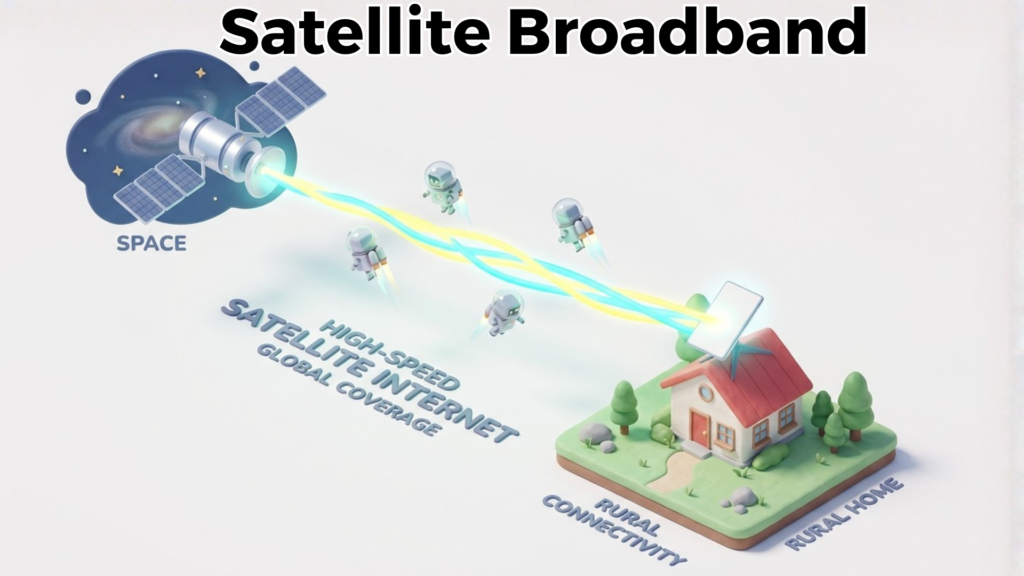
Satellite Broadband using Low Earth Orbit (LEO) satellites—particularly services like Starlink—now delivers speeds, latency, and reliability that challenge terrestrial alternatives in availability. Unlike the geosynchronous satellite systems of the 2000s, which suffered 600+ms latency and data caps, modern satellite networks operate 500–600km overhead, cutting signal travel time to just 20–40ms and enabling genuine productivity for remote workers, gamers, and content creators.
This guide explains how Satellite Broadband works, who it suits best, how it compares to FTTP, FTTC, Cable, and 5G Wireless Broadband, and whether the technology makes sense for your home or business.
For a complete overview of all broadband technologies, see our Broadband Fundamentals: The Complete UK Guide.
What is Satellite Broadband? (Definition & How It Works)
Plain-English Definition
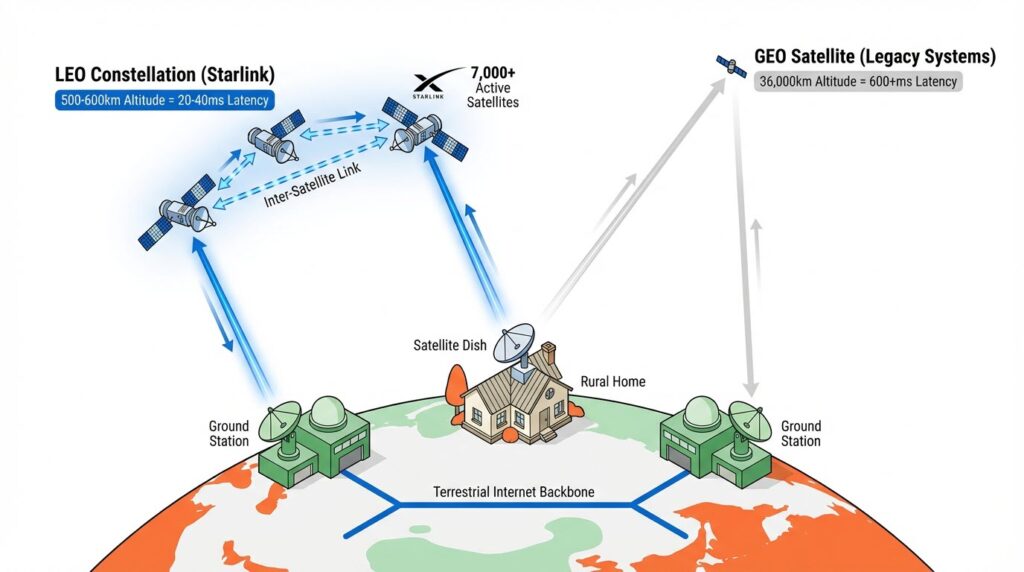
[Satellite Broadband] is internet connectivity delivered via signals transmitted between satellites orbiting Earth and a small receiving dish installed on your property. Modern systems use Low Earth Orbit (LEO) constellations—thousands of satellites positioned at altitudes of 500–600km—rather than the older Geostationary (GEO) satellites that sit stationary 36,000km overhead. This proximity radically changes performance characteristics, making LEO satellite internet viable for consumer use cases that geostationary systems never could support.
The practical upshot: You install a flat, pizza-box-sized satellite dish on your roof or balcony, pointed toward the sky. That dish communicates with a constellation of orbiting satellites, which relay your data to ground stations, then onward to the global internet backbone. From there, information returns via the reverse path. The entire round-trip latency—the time for a data packet to leave your computer, reach a satellite, travel to a ground station, cross the internet, and return—ranges from 20–40 milliseconds, which is low enough for video conferencing, online collaboration, and even fast-paced gaming.
How Satellite Broadband Works (Technical Explanation)
[Satellite Broadband] systems function through a series of interconnected layers. First, your satellite dish communicates with orbiting satellites in the LEO constellation using radio signals in the Ka-band (around 26–40 GHz frequency range). This frequency choice balances high data capacity with atmospheric tolerability, though it does introduce vulnerability to rain fade (more on that shortly).
When you request a web page, stream video, or upload a file, your modem converts the data into radio signals and transmits them skyward. The nearest satellite in the constellation receives the signal, processes it, and either relays it to another satellite in the network or down to a ground station on Earth. Multiple satellites work in coordination—each satellite passes overhead in rapid succession, creating a continuous handoff so your connection persists even as individual satellites move. This is the critical difference from older GEO systems: you’re always in view of a moving satellite, not dependent on a single stationary one.
Ground stations (located in multiple countries to minimize latency) receive the satellite signal and inject your traffic into conventional terrestrial internet infrastructure. Response data follows the reverse path. The entire handshake happens in milliseconds, giving you the responsiveness necessary for real-time tasks.
The constellation of [Starlink], for example, comprises approximately 7,000 active satellites as of late 2024, with SpaceX launching thousands more by 2027. This abundance ensures coverage exists everywhere with line-of-sight to the sky—which is virtually anywhere outdoors and often indoors through windows or walls (with reduced performance).
Key Differences from Terrestrial Technologies
Satellite Broadband operates fundamentally differently from wired and wireless alternatives:
Satellite vs. FTTP: Fibre-to-the-Premise delivers gigabit speeds (145–2,500 Mbps) with very low latency (8–15ms) because data travels via light pulses through physical cables—no atmospheric interference, no signal travel delay. However, FTTP requires extensive ground infrastructure and reaches only 84% of UK premises as of January 2025. Satellite Broadband sacrifices some speed for universal availability; a satellite user gets 25–100 Mbps advertised (often 50–200 Mbps in practice) but can access it from anywhere with sky view.
Satellite vs. FTTC: Copper-based fibre-to-the-Cabinet delivers 38–80 Mbps but uses copper telephone lines for the final mile, which degrades speeds over distance and creates asymmetrical uploads (5–20 Mbps). It’s available to 99% of UK premises but slower and less reliable than satellite in practical terms. Satellite excels in upload symmetry and latency for FTTC subscribers living far from cabinets.
Satellite vs. Cable: Cable Broadband offers 60–500 Mbps (DOCSIS 3.1) with 15–40ms latency where available (~50–60% of UK). Cable is faster than satellite where it exists, but Satellite Broadband reaches areas where cable infrastructure has never been built.
Satellite vs. 5G : 5G delivers 30–300 Mbps with 40–70ms latency but depends on mobile network coverage, which varies dramatically. Satellite Broadband covers the exact same remote areas where 5G fails, and offers more consistent throughput in places with congested mobile networks.
Why Latency is High (and Why It Matters)
Even at 20–40ms, [Satellite Broadband] latency exceeds fibre’s 8–15ms. This occurs because electromagnetic signals, though fast, still travel at light speed—approximately 300,000 km/second. A signal leaving your dish must travel 500km up to a satellite, across the constellation, back down to a ground station, across terrestrial networks, and finally back. That round-trip distance translates to irreducible physics: 20–40ms is genuinely impressive given the 1,000km+ round-trip distance.
Why this matters in practice:
- Video conferencing: Requires under 100ms; satellite’s 20–40ms feels natural, with no noticeable delay in back-and-forth conversation.
- Online gaming: Multiplayer shooters require sub-100ms; Starlink’s latency sits comfortably here (competitive advantage kicks in below 40ms). Single-player games are unaffected.
- File uploading: A 1GB file upload takes the same duration regardless of latency, so latency is irrelevant for bulk transfers.
- Web browsing: Noticeable delay occurs above 150ms; satellite is unaffected.
- Financial trading: Some automated systems require sub-10ms; satellite doesn’t qualify.
For 95% of users, Satellite Broadband latency is negligible.
Satellite Broadband Specifications Explained
Download Speed in Real-World Context
[Satellite Broadband] providers advertise 25–100 Mbps, but real-world testing reveals substantially higher actual speeds in most UK locations.
[Starlink] users report median download speeds of 87 Mbps in UK testing (February 2025, Ookla data). In practice:
- Urban areas with clear sky view: 100–250 Mbps
- Rural areas: 50–150 Mbps
- Peak hours (8 PM–11 PM): 80–120 Mbps
- Off-peak hours: 150–200+ Mbps1
To contextualise these speeds:
- 4K Netflix streaming: Requires 25 Mbps; Starlink exceeds this 3–4x over
- HD video calls (Zoom/Teams): Requires 2.5–4 Mbps; Starlink provides 30–50x headroom
- Cloud backup: 100 Mbps uploads a 1GB file in ~80 seconds; adequate for daily backups
- Large software downloads: A 50GB game downloads in 40–50 minutes at 100 Mbps; acceptable for most users
- Multiple simultaneous users: A household of 3–4 people streaming, gaming, and video calling requires ~50 Mbps aggregate; Starlink comfortably handles this
For context, Ofcom’s January 2025 data confirms the UK average broadband usage is 453 GB monthly. Even users consuming well above average (750 GB/month) face no practical limitation with Satellite Broadband’s typical 1 TB monthly fair-usage threshold.2
Upload Speed & Why It’s Critical
This is where Satellite Broadband genuinely excels versus FTTC.
[Starlink] advertises 5–10 Mbps upload on standard plans but real-world performance delivers 10–30 Mbps (some users report up to 40 Mbps). This is 5–20x higher than FTTC, which maxes out at 5–20 Mbps.
Upload speed becomes critical for:
- Video conferencing: HD video calls (Zoom, Google Meet, Microsoft Teams) require 3–4 Mbps upload for smooth, non-pixelated transmission. Satellite provides 3–10x this requirement.
- Content creation: YouTubers, streamers, and online educators uploading 4K footage need 30+ Mbps for reasonable wait times. A 10 GB video file takes 5+ hours on FTTC (2 Mbps); 20 minutes on Starlink (10 Mbps).
- Cloud backups: Backing up 500 GB takes 2+ days on FTTC; 10–15 hours on Starlink.
- Live streaming: Twitch and YouTube live streaming require 10–50 Mbps upload depending on bitrate and resolution. [Satellite Broadband] meets these needs; FTTC does not.
For remote workers whose job depends on video calls or file sharing, upload speed is the deciding factor. [Satellite Broadband] eliminates the “weak upload” bottleneck that has plagued broadband in the UK since ADSL’s decline.
Latency & Jitter: The Hidden Killers
Latency (round-trip delay) is one metric; jitter (variation in latency) is equally critical for real-time applications.
[Starlink] delivers latency of 20–40 milliseconds with very low jitter (millisecond-to-millisecond variation is typically under 5ms). This stability is essential for:
- VoIP phone calls: Variations above 100ms become noticeable as echo or delay; Starlink remains well below this.
- Online gaming: Consistent latency beats low latency; a game adjusts to 35ms ping, but sudden spikes to 150ms create noticeable lag. Starlink’s stability prevents this.
- Real-time collaboration: Google Docs, Figma, and collaborative coding tools tolerate up to 200ms latency; Starlink’s 20–40ms feels native.
Older satellite systems (GEO, used by Viasat and some Hughesnet plans) suffer 600–700ms latency, which makes video calls choppy, gaming unplayable, and real-time collaboration impractical. Modern LEO systems (Starlink, OneWeb) have eliminated this limitation entirely.
Data Caps & Fair Usage Policies
[Starlink] in the UK currently offers unlimited data on its standard plan (£75/month). No monthly cap exists.
In the USA and Canada, [Starlink] introduced a 1 TB (1000 GB) fair-usage threshold on standard plans (December 2022). If a customer exceeds 1 TB in a month, their traffic receives “lower priority” during congestion, not an outright disconnect. This is a soft cap, not a hard one.
As of December 2025, no confirmation exists that this cap will arrive in the UK, though it’s possible. For context, the average UK household uses 453 GB monthly (Ofcom), meaning a 1 TB cap provides 2.2x headroom for the average user and still accommodates heavy users (750 GB/month) with buffer.
Higher-tier plans from [Starlink] (500 GB/1 TB priority data) offer faster speeds and guaranteed capacity; business plans are unlimited.
Viasat and older GEO providers impose strict monthly caps (50–300 GB), which can trigger overage charges. This is why Starlink and LEO systems are generally preferable for UK consumers.
Weather Impact & Reliability Metrics
This is the central concern for prospective satellite customers.
Rain fade occurs when heavy precipitation absorbs or scatters radio signals between your dish and satellites. The effect depends on:3
- Rain intensity: Light drizzle causes minimal impact; heavy downpour may reduce speeds 20–50%
- Signal frequency: Ka-band (used by Starlink) is more susceptible than C-band, but still tolerates most UK weather
- Dish size and quality: Larger dishes and better equipment mitigate fade
- Duration: Fade typically lasts minutes to an hour; the system recovers once rain passes
In practical UK terms:
- The UK averages 133 days of rain annually, but most is light drizzle
- True heavy rain (>10mm/hour) occurs roughly 15–20 days yearly
- Starlink specifies ≥99% availability, meaning only 7–8 hours of downtime annually expected
Real-world Starlink customers report rain fade as occasional speed dips (from 100 Mbps to 30–50 Mbps) rather than total disconnections. For video calls or web browsing, a temporary drop to 30 Mbps is imperceptible. For simultaneous 4K streaming and gaming, it’s noticeable but not catastrophic.
[Starlink] has implemented rain fade mitigation technology (adaptive coding and modulation) that automatically reduces signal overhead during poor conditions, partially compensating for atmospheric absorption.
Bottom line: Weather is a real concern but manageable. Rural users accustomed to ADSL’s weather sensitivity find Starlink dramatically more reliable. Comparison: ADSL can become unusable during storms; Starlink dips to “slower than advertised” during the same storms.
Contract Terms & Pricing Ranges
[Starlink] (UK, December 2025):
- Standard Plan: £75/month + £299 hardware (dish, router, power supply)
- Premium Plan: £120/month + £599 hardware (higher priority, larger dish for obstructed locations)
- Business Plan: £150/month + £2,410 hardware
- Contracts: 30-day rolling (no long-term commitment required); cancel anytime
- Additional fees: Optional £19 postage, potential “demand surcharge” (£195) in lower-density rural areas
[Viasat] (Limited UK Availability):
- Pricing: £119.99+/month
- Speeds: Up to 50–150 Mbps
- Data caps: Strict (varies by region, often 100–300 GB)
- Hardware: Included in some plans
[OneWeb] (Enterprise-Focused; Limited Residential Availability):
- Residential plans: Not widely available in UK as of December 2025
- Speeds: Up to 195 Mbps (advertised)
- Enterprise pricing: Stratospheric; not comparable to consumer ISPs
Comparison to terrestrial alternatives:
- FTTP: £30–£75/month (no hardware cost, free installation)
- [FTTC]: £25–£60/month (no hardware cost, free installation)
- [5G Wireless]: £30–£80/month (sometimes free or subsidised equipment)
- Satellite (Starlink): £75/month + £299 upfront
The upfront hardware cost (£299) is the primary difference; monthly service pricing is competitive. Over 12 months, total cost is £1,199 (Starlink) vs. £300–900 (terrestrial). However, Starlink is the only option for many rural locations, making the comparison moot.
Satellite vs FTTP vs FTTC vs 5G Wireless (Comparison)
Side-by-Side Specifications Table
| Metric | Satellite (LEO) | FTTP | FTTC | 5G Wireless |
|---|---|---|---|---|
| Download Speed Range | 25–100 Mbps (advertised); 50–250 Mbps (real-world) | 145–2,500 Mbps | 38–80 Mbps | 30–300 Mbps |
| Upload Speed | 5–10 Mbps (advertised); 10–30 Mbps (real-world) | 100–1,000 Mbps | 5–20 Mbps | 10–50 Mbps |
| Latency (Ping) | 20–40 ms | 8–15 ms | 30–60 ms | 40–70 ms |
| Jitter (Stability) | Low (±5 ms typical) | Very low (±2 ms) | Moderate (±10 ms) | Moderate-High (±15 ms) |
| Availability (UK) | 100% (anywhere with sky view) | 84% (Jan 2025) | 99% (Jan 2025) | Growing; 97% outdoor (2025) |
| Monthly Cost | £75 (standard) | £30–£75 | £25–£60 | £30–£80 |
| Setup Cost | £299 (hardware) | Free | Free | Often free/subsidised |
| Hardware | Small dish + router | Fibre termination + router | Modem + router | Mobile dongle or router |
| Fair Usage Cap | None (UK); 1 TB soft cap (trial) | Unlimited | Unlimited | Varies; typically 100–500 GB |
| Weather Impact | Temporary speed dips (rain) | None | None | Varies by signal quality |
| Installation Time | 1–2 weeks (delivery) + DIY setup | 2–4 weeks; professional install | 2–4 weeks; professional install | Immediate (mobile mast dependent) |
| Contract Length | 30-day rolling (no commitment) | 12–24 months | 12–24 months | 12–24 months |
| Best For | Remote rural, backup internet | Content creators, gamers, urban | Budget-conscious, basic use | Areas with good 5G coverage |
| Worst For | Urban (oversubscribed), <20 Mbps users | Slower than fibre | Weak upload, distance-dependent | Dead zones, poor indoor coverage |
When Satellite Wins
[Satellite Broadband] is unambiguously superior in these scenarios:
1. Remote Rural Areas (>5 km from exchange or cabinet)
You live in a rural location where FTTP is not planned, FTTC is 8+ km away (with speeds below 20 Mbps), and 5G coverage is nonexistent. [Satellite Broadband] is your only option and provides 50–100 Mbps with decent latency—a generational improvement over ADSL or spotty mobile hotspots.
2. Backup Internet Connection
Your primary connection fails (FTTP goes down, mobile loses signal). [Satellite Broadband] provides independent redundancy because it doesn’t share infrastructure with terrestrial networks. This is critical for remote workers, small businesses, and rural properties where broadband downtime threatens livelihoods.
3. Immediate Connectivity (No Waiting for Infrastructure)
Your property is on a list for FTTP rollout—10+ years away. You need broadband now. [Satellite Broadband] is installed within weeks; FTTP rollouts take years.
4. Symmetrical Upload Requirements
You’re a content creator, live streamer, or operate cloud-intensive applications requiring fast, symmetrical upload speeds. Satellite Broadband’s 10–30 Mbps upload is 5–6x superior to FTTC and reaches remote properties where FTTP hasn’t arrived.
When Other Technologies Are Better
FTTP is unambiguously better if:
- You’re in an urban or suburban area where it’s available
- You require gigabit speeds for professional video production or data transfer
- You demand the absolute lowest latency (<15 ms) for specialised applications
- You want the highest reliability and future-proofing (fibre lasts 50+ years)
Speed advantage: FTTP is 3–25x faster than Satellite; cost advantage: FTTP is cheaper monthly (£30–75 vs. £75). If available, FTTP is the obvious choice.
FTTC is better if:
- You’re in a developed area where it’s available and Satellite isn’t deployed yet
- You’re extremely price-conscious (£25–40/month vs. £75) and basic speeds (50 Mbps) are sufficient
- You don’t require upload speeds above 10 Mbps and can tolerate 30–60 ms latency
Cost advantage: FTTC is 30–40% cheaper than Satellite monthly; no upfront hardware cost.
5G Wireless is better if:
- You live in an area with excellent 5G coverage and Satellite deployment hasn’t reached you
- You need mobile flexibility (tethering to phone, portability)
- You want to avoid fixed-location infrastructure (dish installation)
- Your data usage is under 300 GB/month (avoiding overage concerns)
Practical advantage: 5G is often faster and has lower latency where coverage is strong; disadvantage is coverage uncertainty and potential for peak-hour congestion in urban areas.
Availability & Coverage Map Context
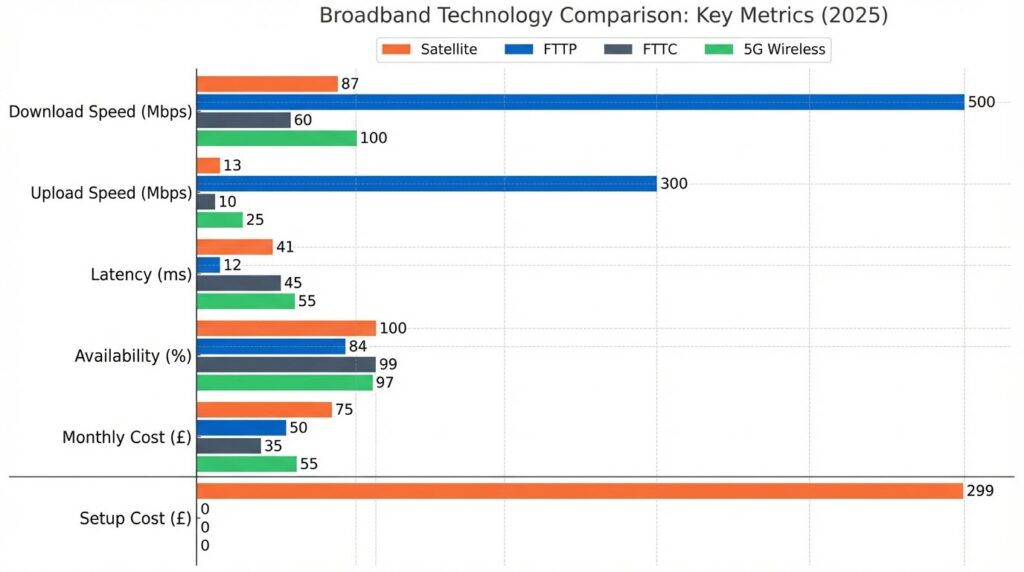
As of January 2025:
- [Satellite Broadband]: 100% UK coverage (anywhere with unobstructed sky view)
- [FTTP]: 84% UK coverage (concentrated in urban/suburban areas; rural rollout ongoing)
- [FTTC]: 99% UK coverage (available almost universally except remote rural)
- [5G Wireless]: 97% UK coverage outdoors; variable indoor penetration
The practical implication: If you’re in a postcode where FTTP is unavailable and FTTC is >5 km away, Satellite Broadband is likely your fastest, most reliable option—regardless of cost.
Best Satellite Broadband Providers (Coverage & Speed Tiers)
As of December 2025, only three satellite broadband operators offer consumer-focused service to UK residents. Only one (Starlink) actively markets and deploys residential service.
Starlink (Emerging Market Leader)
Coverage: UK-wide; available to 99%+ of properties with unobstructed southern sky view
Speed Tiers:
- Standard Plan (£75/month): Advertised 25–100 Mbps download, 5–10 Mbps upload; real-world 50–150 Mbps4
- Premium Plan (£120/month): Larger dish, higher priority during congestion; advertised 200+ Mbps
- Business Plan (£150/month): Fixed IP, 99.99% uptime SLA, dedicated support
- Actual Speeds: Ookla February 2025 testing confirmed median 87 Mbps download, 13 Mbps upload in UK; peak speeds 150–200+ Mbps observed
Equipment & Installation:
- Standard Hardware: Satellite dish, Wi-Fi router, power supply, tripod mount = £299
- Premium Hardware: Larger dish, all-weather casing = £599
- Installation: Self-install (DIY) or professional installation available (cost varies)
- Lead Time: 2–4 weeks delivery; installation typically 1–2 hours
Availability & Network Status:
- Active Satellites: 7,000+ in orbit (as of late 2024)
- Expansion: SpaceX launching 1,000+ additional satellites annually; coverage and capacity continuously improving
- Uptime: 99%+ in clear weather; temporary dips during heavy rain
Customer Sentiment & Reliability:
- Ookla Data (February 2025): Best latency in Europe (41 ms median), surpassing fixed broadband in upload speed tests
- Real-World Remote Work: Users report successful HD video conferencing, large file uploads, and screen sharing without degradation
- Gaming Feedback: Online multiplayer gaming is viable; sub-100 ms latency accommodates competitive play
- Weather Impact: Occasional temporary slowdowns during heavy rain; not permanent disconnections
Contracts & Pricing:
- Commitment: None; 30-day rolling contract, cancel anytime
- Total Cost (12 months): £1,199 (£75 × 12 + £299 hardware) vs. £400–700 for terrestrial alternatives
- Additional Costs: Optional £19 delivery postage; potential “demand surcharge” (£195) in lower-density rural postcodes
Strengths:
- Only provider with genuine mass-market residential availability
- Fastest installation and easiest setup (minimal digging, no technician required)
- Transparent pricing with no hidden overage charges
- Excellent real-world performance exceeding advertised speeds
- No long-term commitment; trial-friendly
Weaknesses:
- Highest upfront equipment cost (£299) among all broadband types
- Weather dependency (rain fade affects speeds temporarily)
- Higher monthly cost (£75 vs. FTTC’s £25–40)
- Potential 1 TB fair-usage cap (currently UK-free, but possible future introduction)
- Limited provider choice (monopoly on consumer LEO satellite market)
Who It’s Best For:
- Rural properties beyond FTTP rollout plans
- Remote workers requiring symmetrical upload speeds
- Content creators unable to access FTTP/cable
- Backup internet requirement for businesses/homesteads
- Properties with significant broadband reliability issues
Viasat (Established but Limited UK Presence)
Coverage: Very limited in UK; mainly legacy customers in select areas
Speed Tiers:
- Standard Plans: Up to 50–150 Mbps download
- Upload Speeds: 3–6 Mbps (significantly weaker than Starlink)
- Latency: High (GEO satellite; 500+ ms typical), making video calls and gaming problematic
Equipment & Installation:
- Professional installation required
- Modem/dish provided by provider
Data Caps & Fair Usage:
- Strict monthly caps (typically 100–300 GB depending on plan)
- Overage charges apply if exceeded
Availability:
- GEO satellite (geostationary orbit; 36,000 km altitude)
- More susceptible to rain fade than LEO systems
- Latency makes real-time applications difficult
Pricing:
- £119.99+/month (higher than Starlink, lower speeds, weaker upload)
Strengths:
- Mature, established network
- Professional installation available
- Some bundled packages (TV + internet)
Weaknesses:
- Data caps unsuitable for modern usage patterns (453 GB/month UK average)
- High latency (500+ ms) unsuitable for video calls, gaming, real-time work
- Higher cost than Starlink with lower speeds
- Limited expansion; not actively marketing UK residential growth
- Professional installation takes longer
Who It’s Best For:
- Legacy customers in existing coverage areas
- Users with extremely light usage (<100 GB/month)
- Not recommended for new UK customers given Starlink’s superior performance and pricing
OneWeb (UK-Focused; Enterprise-Heavy, Emerging Consumer Play)
Coverage Status:
- UK government invested £140m (July 2025) to expand OneWeb constellation by 100+ satellites by 20265
- Plans to extend coverage and add resiliency
Speed Tiers:
- Advertised Speeds: Up to 195 Mbps download; latency ~200 ms (LEO satellite; significantly lower than GEO but higher than Starlink’s mature constellation)
- Status: No officially published upload speeds for residential service
Equipment & Installation:
- Consumer residential hardware and service not widely available in UK as of December 2025
- Requires authorised partner; availability varies by region
Availability & Market Position:
- Primarily enterprise, government, and maritime focused
- Consumer residential service limited; expanding but not yet mass-market
- Contracts often complex and expensive (stratospheric pricing for marine/aviation use)
Pricing:
- Consumer plans: Not transparently listed; significant markup expected
- Enterprise/Government: Thousands of pounds monthly (not comparable to consumer ISPs)
Strengths:
- UK government backing supports long-term expansion
- Lower latency than older GEO systems (200 ms still high for real-time work)
- Plans for network resilience and coverage expansion
Weaknesses:
- Not a practical option for most UK consumers in December 2025
- Residential service not widely available; requires finding authorised partner
- Pricing transparency lacking
- Latency (200 ms) suitable only for browsing, not video conferencing or gaming
- No clear residential service roadmap yet
Who It’s Best For:
- Currently: Not consumers; enterprise and government users in niche applications
- Future: Possibly emerging as alternative to Starlink in 2026–2027 as residential service matures
- Monitor this provider; may become viable alternative in 2–3 years
Who Should Choose Satellite Broadband? (Use Cases & Personas)
Remote Workers (Why/Why Not?)
Why Satellite Works:
[Satellite Broadband] is excellent for remote workers with qualifications. Latency of 20–40 ms is imperceptible for video conferencing; real-world Starlink users report HD Zoom calls, Teams screen sharing, and collaborative Google Docs functioning flawlessly. Upload speeds of 10–30 Mbps mean large file transfers, video uploads, and cloud backups take reasonable time (versus FTTC’s 2–5 Mbps, which can take hours for tasks that matter).
For a remote worker in a rural cottage with no FTTP and FTTC beyond reach, [Satellite Broadband] is transformative—shifting from frustrating, productivity-killing limitations to genuine capability parity with urban colleagues.
Why It Might Not:
If your employer mandates sub-10 ms latency (rare; mainly financial trading, high-frequency algorithms), satellite doesn’t qualify. If heavy weather impacts your region unpredictably and your job cannot tolerate temporary (5–30 minute) slowdowns, terrestrial options are safer.
Additionally, if you share the connection with others (household of 5+ people streaming, gaming, video calling simultaneously), [Satellite Broadband]’s typical 50–150 Mbps may show strain during peak hours. With proper network management (QoS settings, scheduling), this is manageable; without it, congestion is possible.
Real-World Verdict: Remote workers in rural areas: Yes. Urban areas with FTTP: No, FTTP is faster/cheaper. FTTC-only areas beyond 5 km: Yes, satellite is superior.
Rural Residents with No Alternatives
Why Satellite is Essential:
For properties beyond FTTP rollout timelines and where FTTC is >5 km away (with resulting speeds <20 Mbps), Satellite Broadband is the only viable option to access modern broadband. It closes the digital divide—enabling rural residents to work remotely, educate children online, access NHS services, and participate in the digital economy.6
UK government figures (2025) identify ~60,000 homes outside the Universal Service Obligation with no realistic prospect of terrestrial broadband. For these properties, [Satellite Broadband] is the difference between digital exclusion and digital participation.
Why It Might Not:
No realistic downsides for rural residents with no alternatives. Even weather impacts are acceptable when the alternative is 2–10 Mbps ADSL on bad days.
Real-World Verdict: Rural properties (5+ km from infrastructure): Absolutely yes. This is satellite’s primary use case and strength.
Gamers & Streamers (Reality Check)
Why Satellite Can Work:
Misconception exists that satellite is unusable for gaming. In reality, Starlink’s 20–40 ms latency is well within tolerance for online multiplayer gaming. Competitive shooters (Call of Duty, Valorant, Counter-Strike) require <100 ms; Starlink sits 2–3x lower.7
Streamers on platforms like Twitch require upload speeds of 10–50 Mbps depending on bitrate/resolution; [Satellite Broadband]’s 10–30 Mbps upload is 5–10x superior to FTTC.
Real-world Starlink gamers report:
- Smooth gameplay in fast-paced multiplayer
- No noticeable lag compared to fibre users in same game
- Twitch streaming possible at 1080p 60fps (requires ~8 Mbps upload)
- Game downloads slower than fibre but acceptable (50 GB in 40–50 minutes at 100 Mbps)
Why It Might Not:
If you play exclusively on overloaded regional servers during peak hours (8 PM–11 PM), temporary congestion might push speeds down to 50–80 Mbps, which is still adequate but less pleasant than fibre’s consistent 200+ Mbps.
Weather impact is noticeable for gaming in rare scenarios: during heavy rain (>10 mm/hour), speeds may dip from 100 Mbps to 30–50 Mbps, introducing temporary lag. This is uncommon but possible 15–20 days yearly in UK.
Real-World Verdict: Casual to competitive gamers: Yes, very suitable. Professional esports players with sponsors requiring technical specs: Possibly risky (weather dependency is the only concern). Streamers: Yes, upload speeds are a major advantage.
Small Businesses (Backup Internet?)
Why Satellite Makes Sense:
A small business dependent on broadband (e.g., e-commerce, consulting, customer service) in a rural location should absolutely add [Satellite Broadband] as backup. If your primary FTTP/FTTC connection fails, satellite provides independent redundancy from a different infrastructure.
Satellite also handles peak traffic better than smaller terrestrial connections; if your FTTP connection is congested during business hours, adding satellite capacity prevents bottlenecks.
Why It’s Not a Replacement:
For a business’s primary connection, satellite’s weather dependency introduces risk. A heavy rainstorm shouldn’t stop your business; temporary speed dips are acceptable (video calls continue at lower resolution), but total outages are catastrophic.
Best practice: Use satellite as secondary/backup only.
Real-World Verdict: As backup for rural businesses: Yes. As primary: Only if no terrestrial option exists.
Budget-Conscious Users
Why Satellite Might Not Fit:
At £75/month + £299 upfront, [Satellite Broadband] costs 2–3x more than FTTC (£25–40/month with no upfront cost). Over 24 months, total cost is £2,099 (satellite) vs. £600–960 (FTTC).
If you’re purely budget-driven and have any terrestrial option (even FTTC at 15–20 Mbps), FTTC is cheaper.
Why It Might Make Sense:
If you’re in a rural area where FTTC speeds are <10 Mbps, [Satellite Broadband] at 50–100 Mbps is worth the premium: your productivity and quality of life improve measurably, justifying the cost.
Real-World Verdict: Budget-conscious, terrestrial available: FTTC. Budget-conscious, no terrestrial: Satellite Broadband is your only choice anyway.
Content Creators (Upload-Intensive Work)
Why Satellite Excels:
Content creators uploading large 4K files, daily YouTube uploads, or cloud-based editing workflows face a wall with FTTC’s 2–10 Mbps upload. [Satellite Broadband]’s 10–30 Mbps upload is transformative.
Example: A 10 GB 4K video takes 14 hours on FTTC (2 Mbps) and 30 minutes on Satellite (10 Mbps). The difference between viable and impractical.
For creators in rural areas without FTTP access, [Satellite Broadband] is the only path to professional-grade content pipelines.
Real-World Verdict: Rural content creators: Yes, essential. Urban creators with FTTP: FTTP is still faster/cheaper.
Is Satellite Broadband Right for You?
[Satellite Broadband] is not a replacement for fibre—but it’s a transformative alternative for the millions of UK residents in rural postcodes where fibre doesn’t exist and isn’t planned within a decade.
Use [Satellite Broadband] if:
- You’re in a rural location (>5 km from FTTP or cabinet with <20 Mbps FTTC)
- You require symmetrical upload speeds (content creation, live streaming, cloud work)
- You need reliable broadband now (not in 5+ years when infrastructure arrives)
- You value backup redundancy (second internet connection for business continuity)
- You work remotely and are tired of FTTC’s upload limitations
Use [FTTP] if:
- It’s available in your postcode (superior speed, lower cost, no weather dependency)
- You require gigabit speeds or absolute lowest latency
Use [FTTC] if:
- It’s your only available option and Satellite isn’t deployed yet
- You’re extremely budget-conscious and basic speeds (50 Mbps) suffice
Use [5G Wireless] if:
- You need portable/mobile connectivity
- Your usage is under 300 GB/month
- Coverage in your area is strong
Common Questions & Troubleshooting (FAQ)
Does weather really affect satellite internet?
Yes, but it’s manageable.
Heavy rain (>10 mm/hour) causes temporary speed reduction—not total disconnection. Typical scenario: your speed drops from 100 Mbps to 30–50 Mbps during heavy rain. For video calls or browsing, this is imperceptible. For simultaneous 4K streaming and gaming, it’s noticeable.
Real-world Starlink users report experiencing noticeable speed dips roughly 15–20 days yearly in UK (during heavy rainfall events). The other 345+ days, weather is irrelevant.
Snow and ice on the dish can block signal; users in snowy regions need occasional manual clearing (rare in UK lowlands).
Modern LEO systems like Starlink incorporate rain fade mitigation (adaptive coding/modulation) that automatically reduces signal overhead during poor weather, partially compensating for atmospheric absorption.
Bottom line: Weather is a real consideration, but “rain blocks satellite internet” is an exaggeration. Modern LEO systems deliver 99%+ uptime; occasional slowdowns are the reality, not complete outages.
Can I game on satellite broadband?
Yes, absolutely.
[Starlink] latency of 20–40 ms is well below the 100 ms threshold required for online multiplayer gaming. Competitive advantage kicks in below 40 ms; Starlink hits this target.
Real-world Starlink gamers report smooth gameplay in:
- Fast-paced shooters (Call of Duty, Valorant, Overwatch)
- Battle royales (Fortnite, PUBG, Apex Legends)
- Competitive MMORPGs (World of Warcraft, Final Fantasy XIV)
Upload speeds (10–30 Mbps) don’t affect gaming performance (games use minimal upload bandwidth; only download matters).
Caveat: Single 30 GB game download takes 40–50 minutes at 100 Mbps (versus 5 minutes at 500 Mbps on fibre). Not impossible, just slower. During heavy rain, download speed may dip to 30–50 Mbps; large downloads take longer. For someone downloading 3 AAA games in one night during a rainstorm, this is frustrating.
Real-World Verdict: Casual to competitive gamers: Yes. Professional esports players: Only if weather redundancy is acceptable.
Is latency a dealbreaker?
No, not for 95% of use cases.
[Starlink]’s 20–40 ms latency is:
- Imperceptible for video calls (acceptable up to 150 ms)
- Excellent for gaming (competitive advantage below 40 ms)
- Irrelevant for file uploads, downloads, or web browsing
- Suitable for real-time collaboration (Google Docs, Figma)
The only applications where latency matters:
- Financial trading algorithms: Require sub-10 ms (satellite doesn’t qualify)
- Military/emergency systems: Require deterministic, sub-5 ms latency (satellite doesn’t qualify)
- Specialised medical applications: Some telemedicine requires sub-20 ms (satellite marginal)
For everyone else (99%+ of users), Starlink’s latency is a non-issue.
Comparison: Your 20–40 ms satellite latency + your monitor’s 5 ms display lag + your keyboard’s 8 ms input lag = 33–53 ms total perceived delay. Fibre’s 8 ms latency + same peripherals = 21 ms. Difference is unperceptible.
Real-World Verdict: Latency is not a dealbreaker. It’s genuinely excellent for consumer use cases.
How much does satellite broadband cost vs. fibre?
Monthly: Satellite costs 2–3x more. Annual: Satellite has upfront cost.
| Period | Satellite | FTTP | FTTC |
|---|---|---|---|
| Monthly | £75 | £35–60 | £25–40 |
| Setup | £299 | Free | Free |
| 12 Months Total | £1,199 | £420–900 | £300–780 |
| 24 Months Total | £2,099 | £840–1,800 | £600–1,560 |
Satellite is more expensive. However, if FTTP/FTTC is unavailable, comparison is irrelevant—satellite is your only choice.
If FTTP is available, it’s faster (3–25x) and cheaper (£30–75/month). FTTP wins on both metrics.
Real-World Verdict: Budget comparison only matters if terrestrial options exist. If they don’t, satellite cost is acceptable as the only viable alternative.
What’s the installation process?
Starlink: DIY-friendly; typically 1–2 hours.
- Dish placement: Mount the satellite dish on roof, balcony, or pole (unobstructed southern sky view required)
- Cable routing: Run ethernet cable from dish to indoor router (can be wireless if dish has built-in WiFi)
- Power supply: Plug dish and router into standard outlet
- Activation: Power on, app automatically connects to Starlink network, speeds reach full capability in 5–10 minutes
- Network configuration: Configure WiFi password, bridge to existing network if needed
Professional installation available (cost varies; typically £100–300).
Compared to FTTP/FTTC: Terrestrial installation requires fiber/copper cable to be run from street cabinet to your home—a process requiring excavation, cable ducts, and weeks of coordination. Satellite is simpler and faster.
Real-World Verdict: DIY is straightforward; professional install available if preferred. Much faster than terrestrial installation.
Can I use satellite if I have buildings/trees blocking my view?
Partially. Depends on obstruction degree.
[Starlink] requires line-of-sight to southern sky (in northern hemisphere) from approximately 20–45 degrees above horizon. Trees and buildings blocking this view cause:
- Partial obstruction: Speed reduction to 50–80% of maximum
- Full obstruction: Signal loss; connection drops
Workarounds:
- Mount dish higher (roof vs. balcony) for better sight lines
- Trim overhanging tree branches (if feasible)
- Relocate dish to south-facing wall/area
- Use pole mount to elevate dish above roof height
Real-world scenario: A property with 30% tree obstruction experiences speeds around 70–80 Mbps (versus 100 Mbps unobstructed)—still acceptable for most users.
Starlink’s app includes an “obstructions” visualization showing which sky areas are blocked; this helps users assess feasibility before purchasing.
Real-World Verdict: Heavy obstruction makes satellite impractical; light-to-moderate obstruction is manageable with creative mounting.
Sources Cited:- Spacelink Installations. Starlink Speed Test (UK) – Average Speeds Map. https://www.spacelink-installations.co.uk/starlink-speed-test/[↩]
- Ofcom Connected Nations Report. – https://www.ofcom.org.uk/__data/assets/pdf_file/0022/203617/241221-connected-nations-q4-2024.pdf[↩]
- SBS Satbill. Finding The Best Solution To Reduce Satellite Rain Fade. – https://www.sbs-satbill.com/blog/rain-attenuation-in-satellite-communication[↩]
- Starlink Service Plan Details. – https://starlink.com/legal/documents/DOC-1470-99699-90[↩]
- ISPreview. UK Gov Boosts Eutelsat’s OneWeb LEO Broadband Satellites by £140m. – https://www.ispreview.co.uk/index.php/2025/07/uk-gov-boosts-eutelsats-oneweb-leo-broadband-satellites-by-140m.html[↩]
- UK Department for Environment, Food and Rural Affairs. Statistical Digest of Rural England: Connectivity and Accessibility. – https://assets.publishing.service.gov.uk/media/68ee680682670806f9d5e074/5_Connectivity_and_Accessibility_15_10_2025.pdf[↩]
- Satellite Internet. Your Guide to Gaming with Satellite Internet. – https://www.satelliteinternet.com/resources/gaming-on-satellite-internet/[↩]