Choosing the right broadband has become one of the most consequential decisions UK households and businesses face—yet the complexity often goes unacknowledged. Your internet connection underpins everything from your career to your entertainment, from your children’s education to your financial security. When it fails or underperforms, the impact is immediate and costly.
A slow upload speed during a video interview can cost a promotion. A lag spike mid-competitive match can cost a ranked match. A connection dropout during a customer call can cost a client’s trust. Despite this centrality, most UK consumers lack a clear understanding of broadband technologies, provider options, pricing structures, or how to evaluate what they actually need.
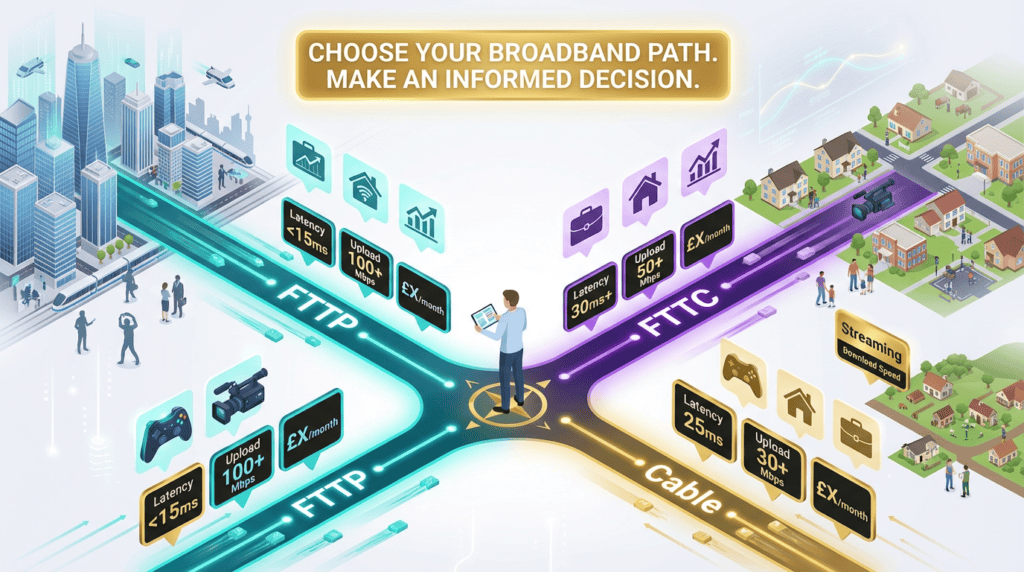
The UK broadband market has transformed dramatically over the past three years. Fibre To The Premise (FTTP), once a luxury reserved for metropolitan areas, now passes over 20 million premises. Fibre To The Cabinet (FTTC), the transitional technology that dominated the 2010s, has been overtaken by FTTP for the first time in late 2025.
Meanwhile, legacy ADSL copper networks are being systematically decommissioned, forcing millions of users to either upgrade or seek alternatives. Wireless broadband options (5G Home and satellite) are now viable alternatives in competitive markets. Against this backdrop of rapid infrastructure change, pricing volatility, and provider consolidation, consumers need a clear, evidence-based guide. 1
This guide addresses all five stages of the broadband decision journey—from recognising that something is wrong with your current connection, to understanding the problem, comparing solutions, validating your choice, and finally executing your purchase.
Whether you are a remote worker struggling with upload bottlenecks during video calls, a gamer frustrated by latency spikes, a content creator unable to upload large files efficiently, a budget-conscious user seeking value, a rural resident with limited options, or a small business owner evaluating connectivity for your team, this guide identifies your specific requirements and recommends technologies and providers that align with your needs.
The Broadband Matchmaker
Tell us how you use the internet, and we’ll match you with the perfect plan.
Understanding Broadband Technologies
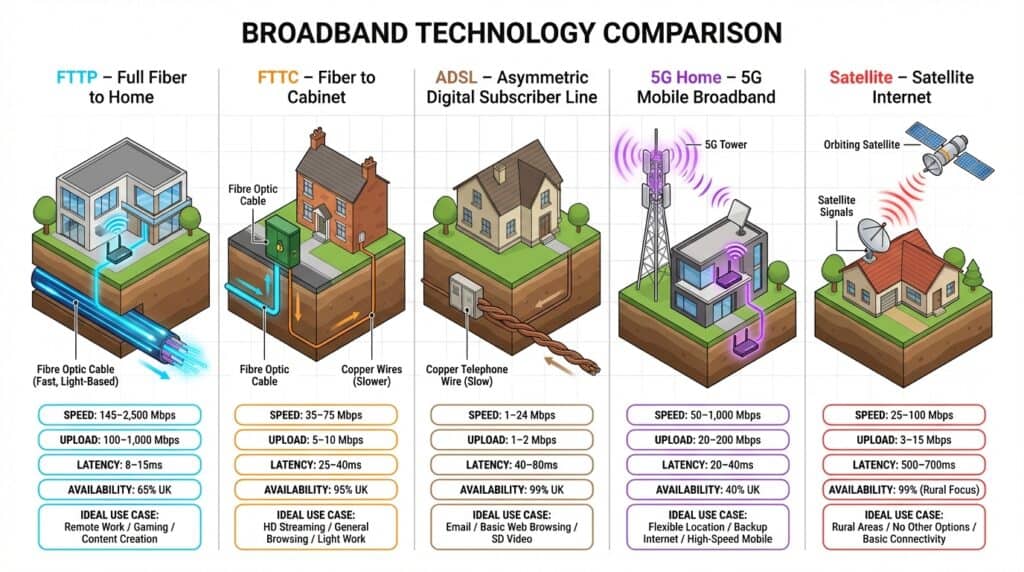
The foundation of any broadband decision is understanding the underlying technology—the physical infrastructure through which data travels to your home or office. The UK broadband market is built on five distinct technology types, each with fundamentally different performance characteristics, availability footprints, and cost structures.
These technologies operate on entirely different principles, which explains why an FTTP connection provides symmetrical 100 Mbps upload speeds while an FTTC connection of similar download speed manages only 5–20 Mbps upload. Understanding these differences is the prerequisite to making an informed decision. 2
Broadband Technology Comparison
Compare speeds, latency, pricing and best use cases across UK broadband technologies
| Technology | Infrastructure | Download Speed | Upload Speed | Latency | Best For | Price |
|---|
FTTP (Fibre To The Premise) – The Future Standard
Definition and How It Works
FTTP (Fibre To The Premise), also known as Full Fibre or Gigabit Fibre, is a broadband technology in which fibre optic cable runs directly from the service provider’s network into your home or business premises. Unlike FTTC, FTTP eliminates the “last mile” copper bottleneck entirely. Data travels through fibre optic strands as pulses of light—a fundamentally different transmission medium than copper wire.
Because light signals experience minimal signal degradation over fibre optic cable, even across long distances, FTTP connections deliver consistent, high-speed performance regardless of proximity to the local exchange or cabinet.
This direct fibre connection means the entire path from the network operator’s backbone to your premises is optical fibre.
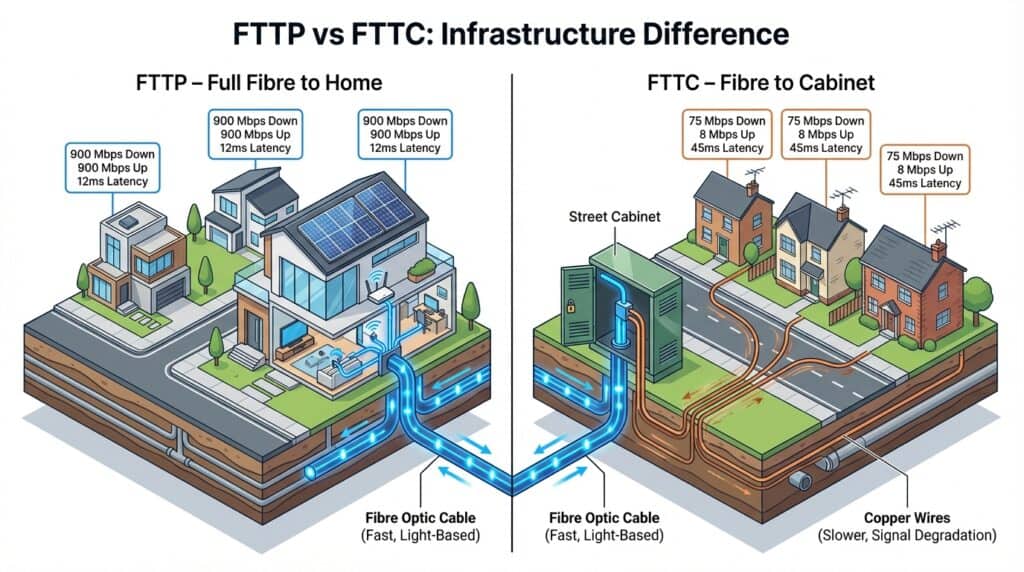
This architecture has profound consequences for upload speeds and symmetry. Whereas FTTC suffers from asymmetrical performance due to copper degradation, FTTP providers can offer symmetrical speeds—meaning download and upload speeds are identical or nearly identical. A customer on a 900 Mbps FTTP plan receives 900 Mbps download and 900 Mbps upload, a capability that fundamentally changes what professionals can accomplish from home.
Real-World Performance Specifications
FTTP typically delivers:
- Download Speed Range: 145 Mbps to 2,500+ Mbps (dependent on plan tier)
- Upload Speed Range: 100 Mbps to 1,000+ Mbps (symmetrical or near-symmetrical)
- Latency: 8–15 milliseconds (excellent for real-time applications)
- Jitter: <3ms (minimal variance, ideal for gaming and video calls)
- Speed Stability: Consistent performance during peak hours (no throttling)
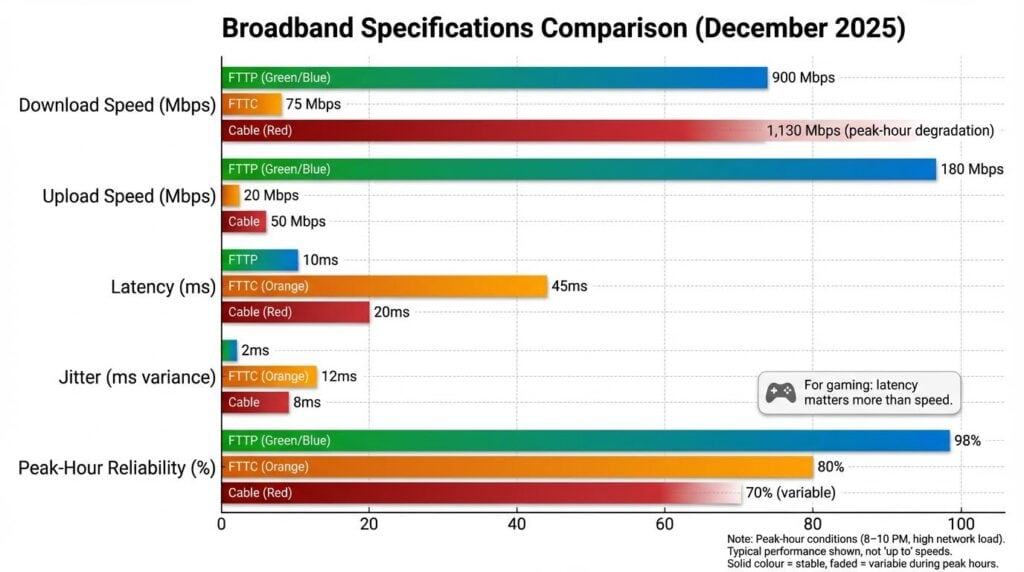
FTTP’s low latency (8–15ms) makes it the only residential broadband technology suitable for competitive gaming. Its high upload speeds (100+ Mbps) eliminate the upload bottleneck that plagues remote workers and content creators on FTTC. Its speed stability means no degradation during peak evening hours. 3
Coverage and Availability in the UK
As of December 2025, FTTP coverage has reached 20.3+ million UK premises (approximately 65% of UK), with +23% year-on-year growth. Openreach operates the largest FTTP footprint (14.2 million premises), while independent fibre operators (Hyperoptic, Community Fibre, Gigaclear) serve ~2 million premises collectively.
Coverage remains uneven: London and major metropolitan areas enjoy near-universal FTTP availability, while rural regions and some suburban areas still rely on FTTC or ADSL. Project Gigabit is expanding coverage to underserved areas through 2027. 4
Which Providers Offer FTTP
FTTP is offered by most UK ISPs, but infrastructure is owned by a smaller set of providers:
Infrastructure Owners: BT Broadband/Openreach (14.2M premises), Virgin Media O2 (cable, 18.4M premises), and Hyperoptic (pure fibre, ~1M premises).
Reseller ISPs: Plusnet, Sky, TalkTalk, EE, and Vodafone purchase wholesale access and retail under their own brands.
Check out our Complete Guide to Fibre-to-the-Premise to Learn More about FTTP
Why FTTP Matters for Different User Segments
The value of FTTP depends entirely on your use case:
- Remote Workers: FTTP’s symmetrical upload speeds (100+ Mbps) eliminate video call delays and enable cloud backup. Justifies £15–£30/month premium over FTTC.
- Gamers: FTTP’s 8–15ms latency provides competitive advantage in real-time multiplayer games.
- Content Creators: FTTP’s symmetrical upload (100+ Mbps) enables efficient video uploading and live streaming. On FTTC, a 50GB file takes 8+ hours to upload; on FTTP, it takes <30 minutes.
- Budget Users: FTTP premium may not be justified for general browsing, email, and streaming. FTTC at £25–£35/month often suffices.
FTTC (Fibre To The Cabinet) – The Transitional Option
Definition and How It Works
FTTC (Fibre To The Cabinet), called Superfast Broadband in UK marketing, is a hybrid technology. Fibre runs to a street-level cabinet (green box), then the final distance uses copper telephone wires. Copper signal degrades over distance—the farther your home from the cabinet, the slower your connection and the more variable your performance.
FTTC also suffers from asymmetrical performance: download and upload speeds are fundamentally different because copper allocates narrower frequency bands to uploads, which are more susceptible to interference. This asymmetry is the critical weakness of FTTC for modern use cases. 5
Real-World Performance Specifications
FTTC real-world performance is highly variable and distance-dependent:
- Download Speed Range: 38–80 Mbps advertised (actual: 30–75 Mbps, distance-dependent)
- Upload Speed Range: 5–20 Mbps (asymmetrical; typically 1/10th of download)
- Latency: 30–60ms average
- Jitter: 5–15ms variance
- Speed Stability: Degrades significantly during peak evening hours (6–10 PM)
- Copper Distance Penalty: ~5 Mbps speed loss per 100 meters from cabinet
Performance degradation during peak hours is critical: a 65 Mbps FTTC connection may achieve advertised speed at 3 PM but drop to 45–50 Mbps during peak evening hours on congested cabinets.
Coverage and Availability in the UK
FTTC covers ~25 million premises (99% of UK) but is in rapid decline:
- Active Connections: ~12–15 million (downward trend as users upgrade to FTTP)
- Decline Rate: 242,000 FTTC connections fell in Q3 2025 as Openreach shifts investment to FTTP
- Planned Retirement: Openreach is systematically decommissioning FTTC where FTTP deployed; first three copper exchanges closed October 2025
FTTC is approaching end-of-life status. While it will remain available in rural areas for several years, urban and suburban users are being rapidly migrated to FTTP.
The FTTC Upload Bottleneck: Why It Matters
The defining characteristic of FTTC is its upload speed limitation. A 65 Mbps download connection provides only 5–8 Mbps upload. This creates critical problems:
- Remote Workers: Video calls require 2.5–5 Mbps per participant. Running two parallel calls (main call + screen sharing) consumes most available upload bandwidth.
- Content Creators: Uploading a 10GB file takes 3+ hours. On symmetrical FTTP (100+ Mbps), it takes 15–20 minutes.
- Cloud Backup: Full system backups that take 2 hours on FTTP may take 24+ hours on FTTC.
For anyone working remotely or creating content, FTTC represents a genuine constraint. This is why FTTP adoption has accelerated: the upload speed differential is no longer optional but essential for modern work patterns.
Check out our Complete Guide to Fibre-to-the-Cabinet to Learn More about FTTC
Why FTTC Remains Relevant (For Now)
Despite limitations, FTTC serves budget-conscious users with basic connectivity needs. A household using broadband for browsing, email, social media, and SD streaming has no practical use case requiring FTTP speeds. FTTC at £25–£35/month represents excellent value vs. FTTP at £45–£70/month. For price-sensitive segments, this trade off—accepting slower, variable performance for lower cost—is rational.
However, this value proposition is eroding as (1) FTTP prices decline and (2) FTTC infrastructure is retired. Within 2–3 years, FTTC will become increasingly rare, forcing users to upgrade to FTTP or seek alternatives. 6
Cable (HFC) – Virgin Media’s Coaxial Alternative
Definition and How It Works
Cable (HFC—Hybrid Fibre-Coax) is a broadband technology using coaxial cable (the same infrastructure as television cable networks) to deliver internet. Data travels via radio frequency signals on the copper/aluminium coaxial cable rather than light pulses through fibre optic strands.
Virgin Media operates the UK’s only large-scale cable network. Unlike FTTP (fibre to every home) or FTTC (fibre to street cabinet), cable networks are fundamentally different architecture: a shared backbone carries signals to neighbourhood nodes, from which coaxial cables branch to individual homes. This shared infrastructure creates a critical performance characteristic: downstream capacity is shared among all homes on the same cable segment.
Virgin Media Broadband

Great Speed and Reliability
✅ You crave speed and reliability for streaming/gaming.
✅ Bundling TV/mobile saves you money (especially with Volt).
✅ Future-proofing matters (Gig1/Gig2).
Real-World Performance Specifications
Cable delivers exceptional download speeds but with significant asymmetry and peak-hour degradation:
Download Speed Range: 145–1,130 Mbps (depending on plan tier)
Actual Off-Peak Performance: 1,000–1,100 Mbps on gigabit packages (95%+ of advertised)
Actual Peak-Hour Performance: 700–850 Mbps on same packages (25–38% degradation during 7–10 PM)
Upload Speed Range: 35–37 Mbps (asymmetrical; cable inherent limitation)
Latency: 15–25ms (acceptable for gaming but higher than FTTP)
Jitter: 3–8ms (acceptable variance)
Speed Stability: Degrades significantly during peak evening hours due to shared infrastructure congestion
The peak-hour degradation is the defining characteristic of cable. A user paying for 1,130 Mbps may achieve this speed at 3 PM but only 700–850 Mbps at 8 PM when neighbors are streaming, gaming, and video calling simultaneously. Ofcom’s November 2025 testing confirmed this degradation on Virgin Media networks.
Check out our Guide – Cable Broadband in 2026: Complete Guide to HFC & DOCSIS Technology to Learn More about Cable Broadband
Coverage and Availability in the UK
Cable coverage is geographically concentrated in urban and suburban areas where historical television cable deployment occurred:
Premises Passed: 18.4 million (approximately 60% of UK)
Available Tiers: M145 (145 Mbps), M363 (363 Mbps), Gig1 (1,130 Mbps)
Geographic Concentration: Urban areas (London, major cities); poor coverage in rural regions
Growth Status: Mature network; limited expansion (focus shifted to FTTP)
Cable availability is NOT nationwide like FTTP/FTTC. Many suburban and all rural areas have zero cable access. For users in cable-available areas, it’s a genuine alternative; for others, it’s irrelevant.
The Upload Bottleneck and Asymmetry Problem
Cable’s critical weakness mirrors FTTC: severe asymmetry between download and upload speeds. A 1,130 Mbps download connection provides only 35–37 Mbps upload—a 30:1 ratio. This asymmetry is not a configuration choice but a cable network design limitation: upstream channels on shared coaxial infrastructure are inherently constrained.
This makes cable unsuitable for content creators, professional video streaming, and demanding remote workers. A content creator cannot upload 50GB files efficiently at 35 Mbps. A video professional live-streaming at 4K consumes 20–50 Mbps upload; 35 Mbps is insufficient.
Which Providers Offer Cable
Virgin Media O2 (owned by Liberty Global) is the sole cable operator. No resellers purchase cable wholesale; cable is available exclusively through Virgin Media under Virgin Media brand.
Virgin Media Available Plans:
- M145 (145 Mbps): £25–£35/month
- M363 (363 Mbps): £40–£50/month
- Gig1 (1,130 Mbps): £60–£80/month
Why Cable Matters (And When It Doesn’t)
Cable is relevant only in two scenarios:
1. Download-Heavy Users in Cable-Available Areas: If your use case is streaming 4K video, large file downloads, and gaming (off-peak), and you have cable access, cable offers exceptional download speed value. The 700–850 Mbps peak-hour degradation is irrelevant if you primarily use broadband at 3 PM.
2. FTTP-Unavailable Areas: If cable is available but FTTP is not, cable becomes the best wired alternative (superior to FTTC). However, this scenario is increasingly rare as FTTP deployment accelerates.
When Cable Is NOT Suitable:
- Content creators requiring upload speeds >35 Mbps
- Remote workers attending peak-hour video calls (7–10 PM) requiring 50+ Mbps symmetrical
- Users in rural areas (cable rarely available outside cities)
- Business-critical applications requiring symmetrical upload
[Coming Soon! See our detailed Virgin Media Review for complete analysis including peak-hour testing results, customer satisfaction, and pricing comparison.]
ADSL – Legacy Technology
Definition and Why It Persists
ADSL (Asymmetric Digital Subscriber Line) uses standard copper telephone wires to deliver internet connectivity without fibre infrastructure. ADSL was the dominant consumer broadband technology from the early 2000s through mid-2010s and still serves approximately 1–2 million premises in rural and remote areas where fibre hasn’t yet deployed.
ADSL is fundamentally limited by copper wire physics: the farther your premises from the telephone exchange, the more signal degradation occurs. This is why ADSL speed ranges are unpredictable and highly location-dependent.
Real-World Performance Specifications
ADSL real-world performance is notoriously variable:
- Download Speed Range: 2–17 Mbps (typical 5–10 Mbps)
- Upload Speed Range: ~1 Mbps
- Latency: 50–100+ milliseconds
- Stability: Poor; frequent dropouts (sensitive to weather and line quality)
- Status: Declining; no longer promoted by ISPs
A 5 Mbps ADSL connection cannot reliably support HD video streaming (requires 8+ Mbps), multiple household members browsing, or real-time applications.
Check out our Guide – ADSL Broadband: Complete Guide to the Outdated Technology to Learn More about ADSL Broadband
Coverage and Alternatives
ADSL still passes ~1–2 million premises, primarily in deep rural areas, historic telegraph zones, and areas awaiting FTTP/FTTC deployment. The UK government’s Project Gigabit scheme targets ADSL-only areas for priority upgrades, rolling out through 2025–2027.7
Alternatives to ADSL:
- Project Gigabit FTTP: Government-funded fibre rollout. Eligible premises receive £4,500 vouchers to subsidise deployment. Timeline: 2025–2027.
- 5G Home Broadband: EE, Vodafone, Three offer 30–300 Mbps (variable), latency 40–70ms. Cost: £25–£35/month. Availability: Growing.
- Satellite Broadband: Starlink and others offer 25–100 Mbps, 20–50ms latency. Last resort for truly remote premises.
5G & Wireless Broadband – Alternative Solutions
Definition and How It Works
5G Home Broadband (Fixed Wireless Access) uses a small external antenna at your premises to receive signals via 5G cellular network towers, eliminating the need for fibre or copper cables. Unlike mobile 5G for smartphones, 5G Home uses dedicated network resources for stable, continuous connectivity to a single location. The technology converts 5G radio signals into WiFi or wired Ethernet.
Three Broadband

No Landline No Problem – Unlimited Data
✅ Renters or frequent movers: No installation = no landlord headaches.
✅ Rural users: If fibre hasn’t reached you, Three’s 4G/5G can be a lifeline.
✅ Temp setups: Think pop-up shops, festivals, or backup internet.
This represents a fundamentally different paradigm: radio waves carry signals over the air instead of physical cables. This has enormous implications for areas without fibre infrastructure—rural regions, islands, remote locations—where cable deployment is prohibitively expensive. It also offers portability: if you relocate within a 5G-covered area, you can maintain service without new cable installation.
Real-World Performance Specifications
5G Home performance varies significantly based on signal strength, network congestion, and proximity to towers:
- Download Speed Range: 30–300 Mbps (typical 80–150 Mbps in urban areas)
- Upload Speed Range: 10–50 Mbps
- Latency: 40–70ms (acceptable but higher than FTTP)
- Speed Stability: Moderate; degrades during peak hours and poor weather
- Jitter: 10–25ms (higher than fibre; can cause stuttering)
- Coverage Dependency: Highly location-specific; clear line-of-sight to towers necessary
For users in areas with good 5G coverage, these specifications suffice for general use, streaming, and remote work. Competitive gamers and professional content creators typically find 5G latency and jitter unacceptable for their use cases.
Coverage and Availability
5G Home is rapidly expanding but remains geographically patchy:
- EE 5G Home: ~40% UK coverage, expanding. Up to 150 Mbps typical.
- Vodafone 5G Home: ~40% UK coverage; comparable speeds.
- Three 5G Broadband: ~30% UK coverage; expanding.
- Growth Rate: ~5% quarterly expansion as new towers deploy.
Availability is concentrated in urban and suburban areas; rural regions still have minimal 5G access, remaining dependent on ADSL, FTTC, or satellite.
Providers: EE, Vodafone, and Three offer 5G Home exclusively. Pricing: £25–£35/month, no data caps.
Check out our Guide – 5G & Wireless Broadband in 2026: Complete Guide to Coverage, Speed & Providers to Learn More about 5G Broadband
Why 5G Home Broadband Matters
5G Home is significant for two reasons:
- Infrastructure Bypass: It eliminates physical cables, making broadband accessible to premises awaiting expensive fibre deployment. A rural home waiting 3–5 years for fibre can now access 80–150 Mbps via antenna installation.
- Competitive Pricing Pressure: As 5G Home becomes available, traditional ISPs respond with competitive pricing. Urban areas where 5G and fibre compete have seen prices decline 10–15% in the past year.
However, 5G Home is not suitable as a permanent replacement for fibre in dense urban areas where wired infrastructure is more efficient. Its primary value is in underserved areas where fibre deployment is economically challenging.
Satellite Broadband – Rural Last Resort
Definition and How It Works
Satellite Broadband transmits data via radio signals bouncing off satellites orbiting Earth. Modern satellite broadband uses low-earth-orbit (LEO) satellites orbiting at 300–2,000 km altitude (vs. legacy geostationary at 36,000 km), dramatically reducing latency. 8
The most well-known satellite provider is Starlink (SpaceX). Starlink launched UK service in 2021 and has expanded to serve ~50,000+ UK premises as of 2025. Other providers (Viasat, OneWeb) exist but have smaller UK presence.
Check out our Guide – Satellite Broadband Explained: Complete Guide to Learn More about Satellite Broadband
Real-World Performance Specifications
Modern satellite broadband has improved dramatically:
- Download Speed Range: 25–100 Mbps (typical 50–80 Mbps on Starlink)
- Upload Speed Range: 5–25 Mbps
- Latency: 20–50ms (dramatic improvement from legacy 500+ ms)
- Jitter: 5–10ms typical
- Speed Stability: Generally stable (unaffected by network congestion; satellites have dedicated spectrum)
- Weather Impact: Heavy rain reduces speeds 15–20%; storms may cause temporary outages
Starlink has achieved latency competitive with terrestrial broadband through LEO constellation. This makes modern satellite suitable for general use, streaming, and even light gaming—a dramatic shift from legacy satellite broadband.
Coverage and Availability
Satellite broadband is theoretically available anywhere on Earth with clear sky view:
- Starlink: Nationwide availability; limited by premises’ ability to install dish with clear southern sky (no tree obstruction). Currently serving ~50,000 UK premises, growing at ~5,000–10,000 customers/month.
- Viasat/OneWeb: Smaller UK presence; similar nationwide availability in principle.
Critical limitation: satellite dishes require clear line-of-sight to southern sky. Premises blocked by trees, tall buildings, or steep terrain cannot use satellite regardless of geographic location.
Providers: Starlink (market leader). Pricing: £43/month service + £399 equipment. Typical performance: 50–80 Mbps download, 5–15 Mbps upload.
Why Satellite Broadband Matters
Satellite is critical for rural and remote areas where wired infrastructure is years away or economically infeasible. A remote Scottish crofter with no practical alternative to 1 Mbps ADSL can access 50–80 Mbps via Starlink for similar cost. However, satellite should be considered a last resort, not an optimal solution:
- Cost: Total ownership (equipment + monthly service) is higher than comparable wired broadband.
- Reliability: Weather-dependent performance (rain reduces speeds); dish installation/removal incurs cost.
- Limitations: Upload speeds remain modest (5–15 Mbps); peak-hour performance depends on satellite constellation capacity.
For users with access to FTTP, FTTC, or 5G alternatives, wired broadband is preferable. Satellite is optimal for genuinely remote premises with no other viable option.
Major UK Broadband Providers
The infrastructure that delivers broadband to your home is owned and operated by a relatively small number of companies, while the internet service you purchase may come from a much larger set of resellers and alternative providers. Understanding this distinction—between network infrastructure owners and retail ISPs—is essential to evaluating your options.
📋 Provider Structure at a Glance
Understanding broadband infrastructure ownership and business models
-
├─ Own physical cables/fibre
-
├─ Sell directly to customers (retail)
-
├─ Sell wholesale to resellers
-
├─ Examples: BT/Openreach, Virgin Media, Hyperoptic
-
💰 Pricing: Premium (£35–£75/mo) due to ownership
-
├─ Buy wholesale access from infrastructure owners
-
├─ Sell under own brand
-
├─ Can undercut prices (no capex)
-
├─ Examples: Plusnet, Sky, TalkTalk, Zen Internet
-
💰 Pricing: Competitive (£25–£50/mo)
A provider offering gigabit speeds on Openreach infrastructure is fundamentally different from a provider owning its own fibre network, yet both may appear identical in marketing materials.
This section maps the UK provider landscape across three tiers: infrastructure owners (who build and own networks), pure fibre operators (who specialise exclusively in fibre deployment), and reseller ISPs (who purchase wholesale access and retail under their own brands).
Key Insight: You often buy from infrastructure owner’s network, through the
reseller’s brand. Example: Plusnet uses Openreach fibre.
Infrastructure Owners – Vertical Integration
Infrastructure owners occupy the highest tier of the broadband supply chain because they control the physical networks serving millions of premises. These companies bear capital expense of laying fibre, maintaining copper lines, or deploying cable; in return, they enjoy both direct retail customers and wholesale revenue from reseller ISPs.
BT Broadband and Openreach – The Incumbent Network Owner
BT Broadband, trading under the Openreach subsidiary brand for network infrastructure, is the UK’s largest fixed-line broadband provider. Openreach has systematically upgraded infrastructure from ADSL to FTTC to FTTP over 15 years. As of November 2025, Openreach’s FTTP network passes 20.3 million premises—the single largest FTTP footprint in the UK, representing approximately 50% of all gigabit-capable coverage.
BT Broadband
Fast Reliable Nationwide Broadband
✅ Guaranteed minimum speeds up to 900 Mbps.
✅ Highly rated BT Smart Hub routers
✅ Great customer support with quick response rates.
Coverage and Technology:
- FTTP Premises Passed: 14.2 million (largest operator)
- FTTC Premises Passed: ~10 million (declining)
- Available Speed Tiers (FTTP): 145 Mbps, 300 Mbps, 900 Mbps
- Symmetrical Upload Option: 900 Mbps packages now offer symmetrical speeds (900 Mbps upload matching download)
Real-World Performance:
BT’s FTTP delivers consistent performance near advertised speeds. 900 Mbps packages average 850–900 Mbps download (95–100% of advertised), with latency 8–15ms and jitter <3ms. Speed stability during peak hours is excellent—BT’s network rarely exhibits congestion-related slowdowns seen on cable networks.
Customer Satisfaction:
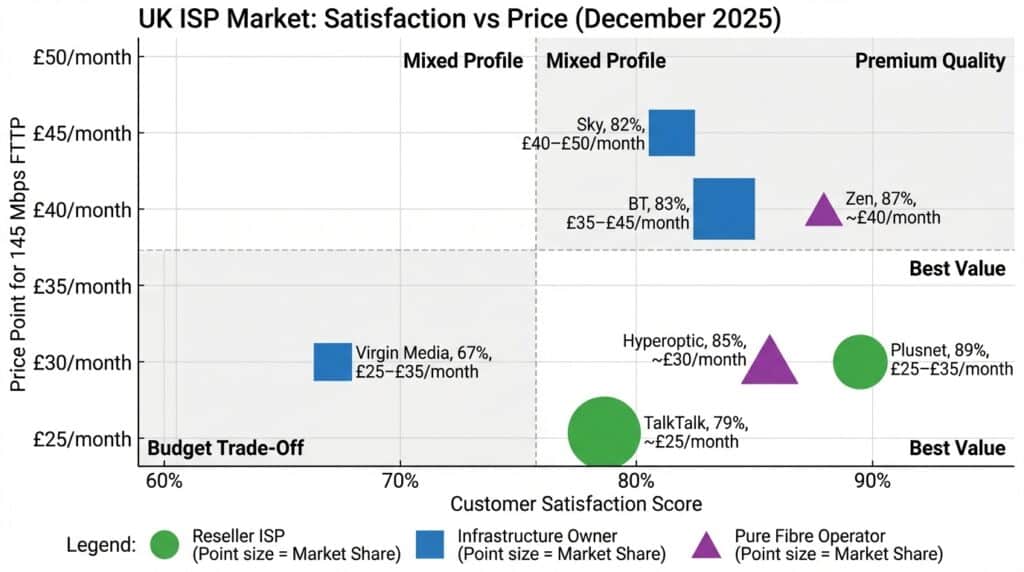
Ofcom Q1 2025: 83% satisfaction rating; 73 complaints per 100,000 customers (middle tier). BT’s advantage: comprehensive bundling (broadband + TV + phone + mobile from single provider). 9
Pricing:
- FTTP 145 Mbps: £35–£45/month
- FTTP 300 Mbps: £45–£55/month
- FTTP 900 Mbps: £60–£75/month
- Setup: Free installation standard
- Contracts: 12-month and 24-month options
Strengths:
- Unmatched FTTP coverage (14.2M premises)
- Reliable performance; consistent speed delivery
- Bundled services available
- Symmetrical FTTP tiers now available
Weaknesses:
- Premium pricing vs. resellers
- Customer satisfaction not highest-tier (83% vs Plusnet 89%)
- Legacy FTTC infrastructure causes performance issues in non-upgraded areas
[Coming Soon! See detailed BT Broadband Review for complete analysis including customer feedback, support quality, and installation experience.]
Virgin Media O2 – The Cable Alternative
Virgin Media O2 operates the only large-scale cable television network (HFC—hybrid fibre-coax) as alternative to fibre. Cable networks use different technology than FTTP: data travels via radio frequency signals on coaxial cable rather than light pulses through fibre.
Virgin Media Broadband
Great Speed and Reliability
✅ You crave speed and reliability for streaming/gaming.
✅ Bundling TV/mobile saves you money (especially with Volt).
✅ Future-proofing matters (Gig1/Gig2).
Coverage and Technology:
- Premises Passed: 18.4 million (approximately 60% of UK)
- Available Speed Tiers: Up to 1.13 Gbps (Gig1), 363 Mbps (M363), 145 Mbps (M145)
- Upload Speeds: 35–37 Mbps on gigabit packages (asymmetrical; cable inherent limitation)
- Distinct Characteristic: Shared infrastructure; multiple homes on same cable segment compete for bandwidth during peak hours
Real-World Performance:
Virgin Media cable delivers exceptional off-peak download speeds but notable peak-hour degradation. 1.13 Gbps packages average 1,000–1,100 Mbps download during off-peak (excellent) but degrade to 700–850 Mbps during peak evening hours (8–10 PM) on congested segments. Latency 15–25ms. Critical weakness: upload capped at 35–37 Mbps unsuitable for content creators. 10
Customer Satisfaction:
Virgin Media’s Q1 2025: 106 complaints per 100,000 customers—significantly worse than BT (73 per 100k) and Plusnet (52 per 100k). However, VMO2 is investing in service improvements; AI-powered support launched November 2025.
Pricing:
- M145 (145 Mbps): £25–£35/month
- M363 (363 Mbps): £40–£50/month
- Gig1 (1.13 Gbps): £60–£80/month
- Setup: Often free for new customers
- Contracts: 12, 18, 24-month; month-to-month available
Strengths:
- Download speed leadership (1.13 Gbps fastest to mass market)
- Broad coverage (18.4M premises; complementary to FTTP)
- Competitive entry-level pricing
- No data caps
Weaknesses:
- Asymmetrical speeds; upload unsuitable for creators
- Shared cable infrastructure causes peak-hour degradation
- Significantly lower customer satisfaction than competitors
- Higher latency than FTTP
[Coming Soon! See detailed Virgin Media Review for complete analysis including peak-hour testing, gaming performance, and customer service experience.]
Hyperoptic – Pure Fibre Specialist
Hyperoptic is an independent, venture-backed pure fibre operator focused exclusively on full-fibre (FTTP) deployment. Unlike Openreach’s mixed FTTP/FTTC estate, Hyperoptic deploys FTTP exclusively where it operates—every customer receives identical, gigabit-capable infrastructure.
Coverage and Technology:
- Premises Passed: ~1 million (expanding; concentrated in London, Manchester, Birmingham, Bristol)
- Available Speed Tiers: 150 Mbps, 300 Mbps, 900 Mbps (all with symmetrical upload)
- Symmetrical Speeds: 900 Mbps packages offer 900 Mbps download AND 900 Mbps upload (true symmetry)
- Upload Speeds: 100–900 Mbps (matching download; complete symmetry)
Real-World Performance:
Hyperoptic’s pure-fibre infrastructure delivers exceptional consistency. 900 Mbps packages average 880–920 Mbps download/upload with latency 7–12ms and near-zero jitter (<1ms). Speed remains stable during peak hours. Defining advantage: true symmetrical speeds enable content creators to upload 100+ Mbps.
Customer Satisfaction:
Hyperoptic achieves highest independent satisfaction ratings: 85%+ customer satisfaction, notably higher than BT (83%), Virgin Media (67–75%), comparable to Plusnet (89%). 24/7 support with reputation for technical expertise.
Pricing:
- 150 Mbps: £20–£30/month (exceptional value for symmetrical speeds)
- 300 Mbps: £35–£45/month
- 900 Mbps: £60–£100/month
- Setup: Free installation
- Contracts: Flexible including rolling month-to-month (rare)
Strengths:
- Symmetrical speeds across all packages (100+ Mbps upload standard)
- Pure fibre guarantees consistent performance
- Highest customer satisfaction (85%+)
- Exceptional support quality
- Flexible contract terms
Weaknesses:
- Limited geographic availability (~1M premises vs. BT’s 14.2M)
- Concentrated in urban areas; not available most suburbs/rural
- Premium pricing in many markets
[Coming Soon! See detailed Hyperoptic Review for complete analysis including symmetrical speed benefits, content creator suitability, and coverage expansion plans.]
Pure Fibre FTTP-Only Operators
Beyond Hyperoptic, several smaller fibre operators specialise exclusively in FTTP within specific regions, often supported by government funding.
Community Fibre: Focuses on dense urban areas, particularly London and south east. Deploys underground fibre. Performance comparable to Hyperoptic (85%+ satisfaction). Pricing competitive: 150 Mbps symmetrical at £20–£25/month. Geographic limitation: London and south east; expansion ongoing.
Gigaclear: Deploys FTTP in rural and suburban areas, often with government funding. Focuses on underserved premises where commercial deployment would not occur. Speeds 50–300 Mbps. Pricing £20–£40/month. Coverage: selective England, Wales, Scotland rural areas.
Zen Internet: Hybrid model; resells Openreach infrastructure in most markets but maintains proprietary fibre backbone in selected areas. Prioritises technical quality and customer support. Customer satisfaction among resellers: highest (87%+). Pricing reflects premium positioning: 145 Mbps at £35–£45/month. Appeal: technical users prioritising support quality.
Reseller ISPs – Best Value and Customer Service
Reseller ISPs purchase wholesale access from infrastructure owners (primarily Openreach and Virgin Media) and retail under their own brands. Resellers don’t own physical networks; they compete on pricing, customer service, bundled services, and brand differentiation. This tier offers superior value: lower prices than infrastructure owners, often better customer service (smaller companies more responsive), and flexible contracts.
Plusnet – Customer Service Leadership
Plusnet resells Openreach infrastructure (80% of customer base) and Virgin Media cable (20%), positioning as the “friendly” alternative. Core strategy: undercut BT and Virgin Media on price while providing superior support.
Coverage and Performance:
- FTTP Availability: 90%+ UK (Openreach)
- FTTC Availability: 99% UK
- Available Speeds: 50 Mbps, 150 Mbps, 300 Mbps, 900 Mbps (FTTP); 67 Mbps (FTTC)
- Real-World Performance: Matches underlying Openreach infrastructure
- Upload Speeds: 8 Mbps (FTTC 67); 100–900 Mbps (FTTP, depending on tier)
Customer Satisfaction:
Ofcom Q1 2025: 89% satisfaction (highest among ISPs). Complaints: 52 per 100,000 customers (lowest major provider). Ofcom designated Plusnet “Best Provider” for overall customer service.
Pricing:
- FTTP 50 Mbps: £25–£35/month (exceptional entry-level value)
- FTTP 150 Mbps: £35–£45/month
- FTTP 900 Mbps: £50–£65/month
- FTTC 67 Mbps: £25–£35/month
- Setup: Free installation
- Contracts: 12-month and 24-month
Strengths:
- Best customer satisfaction and support quality
- Competitive pricing across all tiers
- Broad coverage (90%+ FTTP, 99% FTTC)
- 24-hour fault fix guarantee
Weaknesses:
- Performance limited by underlying infrastructure
- Smaller company; less brand recognition than BT
- Support quality advantage diminishing as larger competitors invest
[Coming Soon! See detailed Plusnet Review for complete analysis including real customer experiences, support quality, and fault resolution times.]
Sky Broadband – TV Bundling Specialist
Sky, owned by Comcast, is the UK’s largest pay-tv provider. Resells Openreach (80% customers) and Virgin Media (20%), positioning as integrated TV + broadband provider.
Sky Broadband

Highly rated service Great Hardware
✅ Packages offering speeds up to 900 Mbps.
✅ Low latency for competitive gaming
✅ Great customer support with quick response rates.
Performance and Pricing:
- FTTP Availability: 90%+ UK
- Speed Tiers: 50 Mbps, 145 Mbps, 300 Mbps, 900 Mbps (FTTP); 67 Mbps (FTTC)
- Pricing: FTTP 145 Mbps at £40–£50/month (higher than Plusnet, reflecting TV bundling premium)
- TV Bundling: Rarely purchased standalone; typically with Sky Q or Now TV streaming
Customer Satisfaction:
Ofcom Q1 2025: 82% satisfaction; 65 complaints per 100,000 customers. Middling; better than Virgin Media, worse than Plusnet.
Strengths:
- Integrated TV + broadband bundling (convenient for Sky TV customers)
- Competitive pricing for bundled packages
- Broad coverage via Openreach/Virgin Media
Weaknesses:
- Bundling creates lock-in; difficult to switch ISP without losing TV
- Support quality lower than Plusnet
- No distinct advantage if broadband-only preference
[Coming Soon! See detailed Sky Broadband Review for complete analysis including TV bundling value, contract flexibility, and switching experiences.]
TalkTalk – Budget Positioning
TalkTalk, independent operator, resells Openreach infrastructure competing primarily on price. Strategy: undercut Plusnet and Sky through aggressive discount pricing.
Performance and Pricing:
- FTTP Availability: 90%+ UK
- Speed Tiers: 50 Mbps, 145 Mbps, 300 Mbps, 900 Mbps (FTTP); 67 Mbps (FTTC)
- Pricing: FTTP 145 Mbps at £25–£35/month (lowest-cost major provider)
- Contracts: Month-to-month options available (rare)
Customer Satisfaction:
Ofcom Q1 2025: 79% satisfaction; 91 complaints per 100,000 customers (second worst after Virgin Media). High complaint rate reflects customer service issues: longer support queues, slower technical resolution.
Strengths:
- Lowest pricing among major providers
- Month-to-month contract options
- Broad coverage via Openreach
Weaknesses:
- Poor customer service quality
- Highest complaint rate among traditional ISPs
- Price discounting often masked by price rises after initial period
[Coming Soon! See detailed TalkTalk Review for complete analysis including contract terms, pricing psychology, and customer service experience.]
EE and Vodafone – Secondary Resellers
EE (BT Group subsidiary) and Vodafone (Deutsche Telekom subsidiary) operate as minor broadband resellers, offering secondary product positioning relative to core mobile businesses. Both resell Openreach/Virgin Media infrastructure with pricing competitive to Sky (£35–£50/month for 145 Mbps).
Vodafone Broadband

Great Value For Money Great Hardware
✅ Packages offering speeds up to 1.1 Gbps.
✅ Latest Wi-Fi hardware eliminating dead zones.
✅ Great customer support with quick response rates.
EE Broadband

Powered by BT With Great Hardware
✅ You crave blistering speeds (1.6Gbps is overkill, but future-proof).
✅ Gaming or WFH is non-negotiable (hello, Game Mode!).
✅ You value quick customer support and low complaint rates.
Customer satisfaction: 75–80% (moderate). Complaints: 60–70 per 100k. Primary appeal: bundling with existing EE/Vodafone mobile contracts. For broadband-primary users, Plusnet offers superior value.
Provider Comparison at a Glance
UK Broadband Providers
Compare 11 leading broadband providers with detailed specs, pricing & customer satisfaction
| Provider | Infrastructure | Coverage | Max Speed | Upload | Price | Satisfaction | Complaints | Best For |
|---|
Key Takeaways:
- Lowest Price: TalkTalk (£25–£35), but with customer service trade-off (91 complaints per 100k)
- Best Value (Price + Service): Plusnet (£25–£35 with 89% satisfaction, 52 complaints per 100k)
- Fastest Download: Virgin Media (1.13 Gbps), but asymmetrical upload unsuitable for creators
- Best Upload Performance: Hyperoptic/Community Fibre (symmetrical 900 Mbps), optimal for content creators
- Broadest FTTP Coverage: BT/Openreach (14.2M premises)
- Best Customer Satisfaction: Plusnet (89%) and Zen (87%)
- Most Complaints: Virgin Media (106 per 100k)
Key Broadband Specifications Explained
The specifications listed in broadband marketing materials—download speed, upload speed, latency, jitter, reliability, contract terms, pricing—are more than abstract numbers. Each specification directly impacts your lived experience: whether video calls stutter, whether file uploads complete in minutes or hours, whether your gaming reaction time is competitive or hobbling.
Yet these specifications are frequently misunderstood, misrepresented in marketing, or oversimplified into a single metric (speed in Mbps) that masks the nuance underlying different use cases. This section decodes each specification, explains what the numbers mean in real-world terms, and maps specific specifications to specific use cases.
Download Speed – What You Need to Know
Download speed measures how quickly data travels from the internet to your device—the data you receive when streaming video, downloading files, or loading web pages. It is expressed in Mbps (megabits per second), where 1 Mbps equals 1 million bits per second. Download speed is the metric most commonly advertised by ISPs and most frequently misunderstood by consumers.
Definition and Measurement
Download speed represents the maximum theoretical rate at which your connection can receive data. When an ISP advertises “up to 145 Mbps,” that number reflects ideal laboratory conditions: a single device connected via wired Ethernet (not WiFi), no network congestion, no interference, and optimal distance from the network infrastructure. Real-world download speeds are typically 70–95% of advertised speeds due to protocol overhead, network routing inefficiency, and infrastructure sharing.
A critical distinction: “up to 145 Mbps” means maximum burst speed, not sustained speed. Your connection may briefly reach 145 Mbps but settle to 120–135 Mbps sustained. This distinction matters less for general browsing but significantly impacts large file downloads or sustained video streaming.
Benchmark Requirements by Activity
Different online activities require different minimum download speeds. Understanding your requirements prevents overpaying for excess capacity or purchasing insufficient speed.
| Activity | Minimum Download Speed | Reason |
|---|---|---|
| Email & Web Browsing | 5 Mbps | Loading pages, downloading attachments |
| Standard Definition Streaming (480p) | 3–5 Mbps | Netflix SD, YouTube 480p |
| HD Streaming (1080p) | 8–15 Mbps | Netflix HD, YouTube 1080p |
| 4K Streaming (2160p) | 25+ Mbps | Netflix 4K, YouTube 4K |
| Multiple Household Users | 50–100 Mbps | 3–4 simultaneous HD streams + browsing |
| Cloud Gaming | 35–50 Mbps | Xbox Game Pass, GeForce Now |
| Video Conferencing (1:1) | 2.5–5 Mbps | Incoming video download |
| Video Conferencing (Group, 6+ participants) | 10–15 Mbps | Multiple simultaneous video streams |
Key Takeaway: Most households require 50–100 Mbps download speed to support multiple simultaneous activities without congestion. Gigabit speeds (900+ Mbps) provide marginal benefit for general use unless your household includes professional video editing or multiple simultaneous 4K streams.
“Up To” Speeds vs. Typical Performance
ISPs legally must deliver specified percentages of advertised speeds under normal conditions. Ofcom requires ISPs to disclose “typical speeds” in contract terms. However, typical speeds vary dramatically by time of day, network congestion, and infrastructure type.
FTTP Typical Performance:
- Advertised 145 Mbps → Typical 138–142 Mbps (95%+ delivery)
- Advertised 300 Mbps → Typical 285–298 Mbps (95%+ delivery)
- Advertised 900 Mbps → Typical 850–900 Mbps (94–100% delivery)
- Peak-hour degradation: Minimal (<5%)
FTTC Typical Performance:
- Advertised 67 Mbps → Typical 50–65 Mbps (75–97% delivery, distance-dependent)
- Advertised 74 Mbps → Typical 55–72 Mbps (74–97% delivery, distance-dependent)
- Peak-hour degradation: Significant (15–30% during 8–10 PM)
Virgin Media Cable Typical Performance:
- Advertised 1,130 Mbps → Typical 1,000–1,100 Mbps off-peak; 700–850 Mbps peak-hour
- Peak-hour degradation: Significant (25–38%)
The pattern is clear: FTTP delivers consistent performance across day/night cycles. FTTC and cable degrade significantly during peak hours on congested infrastructure.
Why Download Speed Alone Is Misleading
Marketing focuses on download speed because it’s the largest number. However, download speed in isolation is misleading:
First, upload speed often matters as much as download speed for modern work. A content creator uploading a 50GB video file is bottlenecked by upload speed, not download speed. A remote worker in a video call is bottlenecked by upload speed. Yet ISPs advertise 900 Mbps download while burying 8 Mbps upload in fine print.
Second, latency and jitter often matter more than raw speed for real-time applications. A 100 Mbps connection with 8ms latency is superior to a 300 Mbps connection with 60ms latency for gaming, video calls, or live collaboration. Marketing rarely mentions these metrics because they’re harder to sell. 11
Upload Speed – Critical for Modern Work
Upload speed measures how quickly data travels from your device to the internet—the data you send when uploading files, making video calls, or backing up data to cloud storage. Upload speed is expressed in Mbps but represents an entirely different network path and bandwidth allocation, particularly on asymmetrical technologies like FTTC and cable.
⚠️ Upload Speed Reality Check
What upload speeds actually mean for your use case
-
├─ 10 GB file: 20+ HOURS to upload
-
├─ Video call requires 100% of available bandwidth
-
└─ ⛔ Not viable for content creators
-
├─ 10 GB file: 40 minutes to upload
-
├─ Video call uses only 14% of available bandwidth
-
└─ ✓ Acceptable for work-from-home, NOT for creators
-
├─ 10 GB file: 1–2 MINUTES to upload
-
├─ Video call uses only 5% of available bandwidth
-
└─ ⭐ IDEAL for content creators, video professionals
Asymmetrical vs. Symmetrical: The Architecture Divide
The fundamental divide in UK broadband is between asymmetrical networks (FTTC, cable, 5G, satellite) and symmetrical networks (FTTP). This is not marketing distinction—it reflects underlying physics and infrastructure architecture.
Asymmetrical Networks (FTTC, Cable, 5G):
These technologies allocate fundamentally different bandwidth to download and upload directions. On FTTC, copper wires carry a wider frequency band for download signals and narrower band for uploads; copper means upload signals degrade more severely, resulting in speeds 1/10th to 1/20th of downloads. On cable (HFC), the upstream channel is shared among all households on the segment; cable designers allocated minimal upstream capacity because historical usage (pre-cloud, pre-video conferencing) saw minimal upstream demand.
Real-world impact: A 67 Mbps FTTC connection provides 5–8 Mbps upload. A 1,130 Mbps cable connection provides 35–37 Mbps upload. The asymmetry is a technology limitation, not a feature.
Symmetrical Networks (FTTP):
Fibre optic infrastructure treats download and upload identically; light pulses travel with equal efficiency in both directions, and fibre backbone providers allocate equal bandwidth to each direction. A 900 Mbps FTTP connection provides 900 Mbps upload. A 150 Mbps FTTP connection provides 150 Mbps upload. This symmetry fundamentally changes what users can accomplish.
Real-World Upload Speed Requirements
Upload speed requirements vary dramatically by use case:
| Use Case | Minimum Upload Speed | Why It Matters |
|---|---|---|
| 1 Mbps | Sending emails with attachments | |
| Cloud Backup (Automated) | 5–20 Mbps | Continuous background sync |
| Video Conferencing (1:1) | 2.5–5 Mbps | Sending camera feed |
| Video Conferencing (Group, 6+ participants) | 10–15 Mbps | Multiple participant data |
| Live Streaming (1080p, 60fps) | 8–15 Mbps | Sustained upstream for video |
| 4K Video Upload (50GB file) | 20–50 Mbps | Upload time: 8 Mbps = 12 hrs; 100 Mbps = 26 min |
| Professional Video Streaming (Multiple streams) | 50+ Mbps | Content creators, broadcasters only |
| Real-time Collaboration | 10–20 Mbps | Design, video editing, CAD real-time sync |
Key Insight: Upload speed requirement depends entirely on your profession. A general office worker may function on 5–8 Mbps upload (FTTC). A content creator or video professional requires 50+ Mbps upload (FTTP only).
The Content Creator and Remote Worker Divide
Upload speed asymmetry has created a de facto class divide in UK broadband: those with symmetrical FTTP access (content creators, remote workers) can work efficiently from anywhere; those with asymmetrical FTTC or cable face workflow constraints. 12
A content creator on Hyperoptic (symmetrical 900 Mbps) uploads video in 30 minutes. The same creator on FTTC (5–8 Mbps upload) requires 10+ hours—often overnight.
Similarly, a remote worker on FTTC attending back-to-back video calls (each requiring 5+ Mbps upload) experiences quality degradation if others browse simultaneously. The same worker on FTTP experiences zero degradation because 100+ Mbps upload overhead remains.
Latency & Jitter Explained
Latency and jitter are network timing metrics less visible than speed (Mbps) but often more important for real-time applications. Latency measures time delay for data to travel from your device to a remote server and back; jitter measures variance in that delay. For general web browsing and video streaming, latency is irrelevant. For gaming, video calls, and real-time collaboration, latency and jitter are critical.
| Latency Tier | Experience | Competitive Viability | Example Games |
|---|---|---|---|
| <15 ms | No lag | Pro/esports level | Call of Duty, Valorant (pro) |
| 15–30 ms | Barely noticeable | Casual ranked play | Call of Duty, Valorant (casual) |
| 30–60 ms | Noticeable | Single-player/co-op OK | Casual, story-driven games |
| 60–100 ms | Frustrating | Significant disadvantage | Multiplayer unplayable |
| >100 ms | Unplayable | Rubber-banding lag | Avoid for ANY multiplayer |
Definition and Measurement
Latency (called “ping” in gaming) is measured in milliseconds (ms). A latency of 10ms means data takes 10 milliseconds to travel from your device to the server and receive response back. Lower latency is always better for real-time applications.
Jitter is variance in latency from packet to packet. If connection has 10ms latency ±0.5ms, jitter is low (0.5ms); if latency fluctuates between 5ms and 50ms, jitter is high (45ms). High jitter is worse than consistently high latency because unpredictability causes stuttering and audio/video sync issues.
Typical Latency by Technology:
- FTTP: 8–15 ms (excellent)
- FTTC: 30–60 ms (acceptable)
- Cable (Virgin Media): 15–25 ms (good)
- 5G Home: 40–70 ms (moderate)
- Satellite (Starlink, LEO): 20–50 ms (acceptable)
- ADSL: 50–100+ ms (poor)
Typical Jitter by Technology:
- FTTP: <3 ms (excellent stability)
- FTTC: 5–15 ms (moderate variance)
- Cable: 3–8 ms (good)
- 5G Home: 10–25 ms (higher variance)
- Satellite: 5–10 ms (stable LEO satellite)
Real-World Impact on Gaming
Competitive multiplayer games require sub-30ms latency to be competitive; pro players target <15ms.
Competitive Gaming Latency Targets:
- <15 ms: Competitive advantage (pro-level)
- 15–30 ms: Competitive viability (casual ranked)
- 30–60 ms: Casual gaming acceptable
- 60–100 ms: Significant disadvantage
- 100 ms+: Unplayable (frustrating lag)
FTTP is the only residential technology guaranteeing <15ms latency consistently. FTTC (30–60ms) is marginal. Cable (15–25ms) is viable but peak-hour congestion can spike jitter, causing lag spikes.
Video Call Quality and Real-Time Collaboration
Video conferencing latency requirements are less strict than gaming (<150ms acceptable), but jitter is more critical because high jitter causes audio sync issues, stuttering, and momentary freezes that degrade comprehension.
A video call on FTTP (8–15ms latency, <3ms jitter) feels natural; conversation flows with minimal lag. On FTTC (30–60ms latency, 5–15ms jitter), there’s noticeable but acceptable delay—similar to satellite phone calls. On congested cable (>100ms latency during peak hours, 20+ ms jitter), call quality noticeably degrades: audio sync issues, momentary freezes, compressed video.
For professionals whose workflows depend on real-time communication, FTTP removes latency concerns entirely. FTTC or cable introduces variables that can degrade call quality during peak hours.
| Technology | Latency | Jitter | Packet Loss | Best For | Worst For |
|---|---|---|---|---|---|
| FTTP | 8–15 ms | <3 ms | <0.1% | Gaming, video calls, real-time | Nothing (optimal) |
| Cable | 15–25 ms | 3–8 ms | 0.1–0.5% | Gaming off-peak, streaming | Peak-hour gaming |
| FTTC | 30–60 ms | 5–15 ms | 0.5–2% | Video calls, browsing | Competitive gaming |
| 5G Home | 40–70 ms | 10–25 ms | 0.1–1% | Rural streaming | Real-time gaming |
| Satellite | 20–50 ms | 5–10 ms | 0.1–0.5% | General use | Weather-dependent |
| ADSL | 50–100+ ms | 10–30 ms | 1–5% | Legacy only | Everything (deprecated) |
Reliability and Uptime Guarantees
Reliability encompasses multiple metrics: uptime percentage (proportion of time service is available), mean time to repair (MTTR—how quickly faults are fixed), and jitter/packet loss (whether connection is stable when available).
Uptime Percentages and Service Level Agreements (SLAs)
Residential Broadband:
ISPs do not typically guarantee uptime percentages for residential customers; instead, they offer “best effort” service. UK ISPs achieve approximately 98–99% uptime on FTTP infrastructure (meaning 7–14 hours downtime per year).
FTTC and cable networks are less reliable due to shared infrastructure and copper degradation. FTTC uptime: 96–98% (10–30 hours downtime/year); cable: 97–99% depending on congestion.
These percentages sound high until experienced: 98% uptime means 7 hours downtime per year; for a user experiencing a fault during a critical moment, 98% uptime provides no comfort.
Business Broadband:
Business customers can purchase SLAs guaranteeing uptime percentages with financial compensation if service falls below agreed targets. Business FTTP packages offer:
- 99.0% SLA: Up to 87 hours downtime/year; £50–£100 monthly cost premium
- 99.9% SLA: Up to 8.7 hours downtime/year; £150–£250 monthly cost premium
- 99.95% SLA: Up to 4.3 hours downtime/year; £300–£500 monthly cost premium
Mean Time to Repair (MTTR)
How quickly an ISP repairs a broadband fault matters as much as how often faults occur. A provider with 98% uptime but 48-hour repair timeframe is worse than a provider with 97% uptime and 4-hour repair timeframe.
Ofcom Q1 2025 MTTR Data (Average Fault Repair Time):
- Plusnet: 4–6 hours (fastest)
- BT Broadband: 8–12 hours
- Sky Broadband: 10–14 hours
- Virgin Media: 12–24 hours (poorest MTTR)
- TalkTalk: 14–24 hours (highest MTTR)
- Hyperoptic: 2–4 hours (specialist, highest priority)
Practical Impact:
If your FTTP connection fails Monday morning at 9 AM, Plusnet’s 4–6 hour MTTR means restoration by 1–3 PM. Virgin Media’s 12–24 hour MTTR means restoration by Tuesday, missing an entire workday. For remote workers and businesses, MTTR is often more important than base uptime percentage.
Packet Loss and Connection Stability
Beyond uptime percentage, connection stability is measured by packet loss: the percentage of data packets that fail to reach their destination. Quality internet should have <0.1% packet loss; <1% acceptable; >1% poor.
FTTP networks typically achieve <0.1% packet loss even during peak hours. FTTC networks commonly experience 0.5–2% packet loss during peak hours on congested cabinets; this causes noticeable video quality reduction, real-time application stuttering, and online gaming lag.
Packet loss is invisible in marketing materials but profoundly important for real-time applications. A video call with 1% packet loss experiences noticeable stuttering; a multiplayer game with 1% packet loss experiences lag spikes.
Contract Terms & Pricing
Broadband contracts vary significantly in length, pricing structure, and pricing dynamics. Understanding these terms is critical to avoiding price shock or being locked into unfavourable terms.
Contract Length Options
Month-to-Month (Rolling Contracts):
- Availability: Rare; TalkTalk and boutique providers
- Pricing: Typically 20–30% premium (£5–£15/month higher)
- Advantage: Complete flexibility; cancel without penalty
- Disadvantage: Higher cost; price may increase with 30-day notice
- Best For: Users uncertain of future location/needs
12-Month Fixed Contracts:
- Availability: Standard option most ISPs
- Pricing: Moderate; £3–£8/month cheaper than month-to-month
- Advantage: Price protection for full year; moderate commitment
- Disadvantage: 30–60 day notice required; early exit may incur penalty
- Best For: Most consumers; optimal commitment length
24-Month Fixed Contracts:
- Availability: Standard from BT, Virgin Media, Sky
- Pricing: Cheapest option; £5–£10/month cheaper than 12-month
- Advantage: Maximum price protection; lowest monthly rate
- Disadvantage: Longest lock-in; early exit penalties substantial; risky if moving house
- Best For: Users confident in 2-year stability; budget-conscious
30-Day Rolling:
- Availability: Some resellers (Zen Internet)
- Pricing: Competitive with 12-month (not premium)
- Advantage: Cancel with 30 days notice; no early exit penalty
- Disadvantage: Price protection only 30 days
- Best For: Users valuing flexibility without premium pricing
Pricing Structures and Hidden Costs
Base Monthly Fee:
The headline price advertised (e.g., “£25/month for 145 Mbps FTTP”). This is recurring monthly cost.
Installation/Setup Cost:
- Standard Residential: Free for new customers; £49.99 if professional engineer required
- Expedited Installation: £50–£100 premium for 48-hour installation
- Business Installation: £100–£500+ depending on complexity
Equipment Cost:
- FTTP/FTTC/Cable: Free (ISP-provided router/modem standard)
- 5G Home: Free (ISP-provided antenna + router)
- Satellite: £399–£599 (upfront equipment cost)
Line Rental or Phone Service:
- Some older contracts bundle “line rental” at £8–£15/month
- Modern FTTP contracts rarely include mandatory line rental; it’s optional
- Avoid unless you actively use a landline
Contract Exit Fee (Early Termination):
- Month-to-month: None (30-day notice sufficient)
- 12-month contract: Typically 50% of remaining contract value
- 24-month contract: Typically 50–100% of remaining contract value
Example Exit Fee: 24-month contract at £50/month; cancelling after 12 months = 12 months remaining × £50 × 50% = £300 exit fee.
Price Protection and Price Rises
A critical but often-overlooked aspect: what happens to your monthly fee after the initial contract period?
Typical Pricing Pattern:
- Month 1–12: Promotional rate (e.g., £25/month)
- Month 13 onward: Standard rate (e.g., £45/month, an 80% increase)
This pattern is standard across all ISPs. Users often don’t notice until month 13 when direct debit jumps.
Price Protection Options:
- Fixed-term protection: Price guaranteed not to change during contract term (most ISPs offer)
- Price protection extension: Some ISPs offer extended protection for loyalty
- Price cap: CPI or fixed percentage cap on post-contract increases (rare)
Best Practice:
Month 11 of your contract, contact your ISP and ask for a renewal rate. Most ISPs will offer a loyalty rate (typically £5–£15/month discount) to retain customers. If they refuse, switching providers every 12–24 months is economically optimal; switching cost is usually less than price increase penalty.
Bundling and Cost Optimization
Bundling (broadband + TV + mobile + phone) is a pricing strategy to create switching friction. However, bundling often increases total cost if individual services are better priced elsewhere.
Bundling Advantage:
Broadband (£40/month) + Sky TV (£30/month) separately = £70/month. If bundled, Sky offers £55/month—saving £15/month or £180/year.
Bundling Disadvantage:
If you prefer streaming services (Netflix, Prime Video, Disney+) over live TV, purchasing TV as part of a bundle wastes £25–£30/month. Broadband-only with streaming subscriptions is cheaper.
Recommendation:
Calculate bundled vs. unbundled costs:
- FTTP broadband (lowest available): £25–£35/month
- Optional TV (Sky, Now TV, or streaming): £15–£30/month
- Optional mobile (EE, Vodafone, Three): £15–£25/month
- Total: £55–£90/month.
💡 CONTRACTS STRATEGY:
– At month 11, contact ISP and negotiate loyalty discount
– Most ISPs offer £5–£15/month discount to retain customers
– If your renewal contract price increases → refuse → switch providers
Finding the Right Broadband for Your Needs
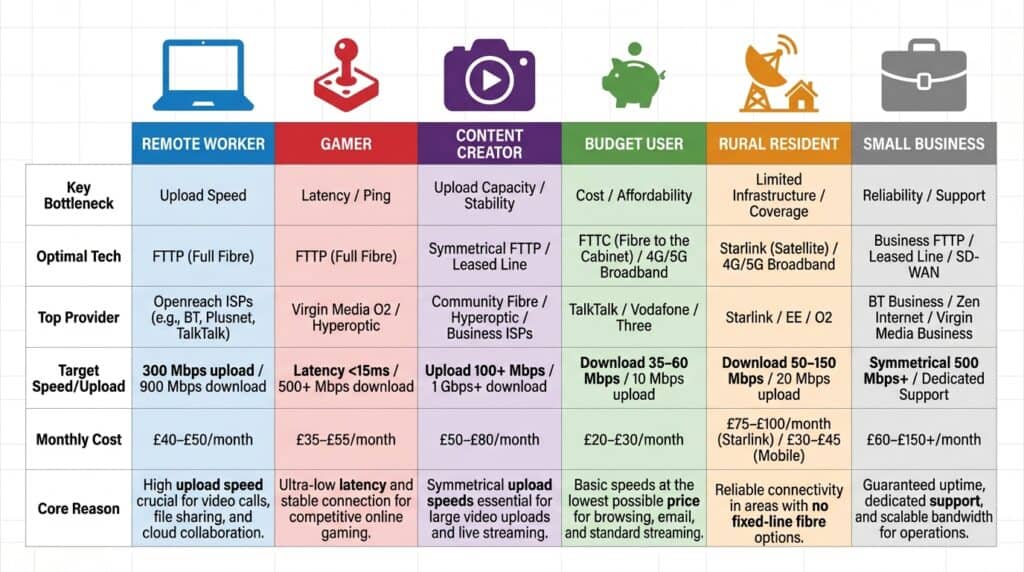
The preceding sections have defined broadband technologies, mapped the provider landscape, and explained the specifications that determine real-world performance. Yet this information is only useful if you can translate it into a personal decision: “Which technology and provider combination serves my specific situation?“
This section bridges that gap by identifying six distinct user personas—each with fundamentally different requirements.
The core insight: there is no universally “best” broadband; there is only the best broadband for your use case.
For Remote Workers
Remote work has fundamentally changed broadband from a discretionary service to a productivity tool. A remote worker’s broadband is as critical as an office worker’s desk.
Key Requirement: Upload speed is often more critical than download speed. Video calls require 5+ Mbps upload per call; screen sharing adds 2–3 Mbps; cloud backup requires 5–20 Mbps. A remote worker on FTTC (5–8 Mbps upload) is bottlenecked when attending multiple simultaneous calls. 13
Optimal Technology: FTTP – Only technology offering symmetrical upload speeds (100+ Mbps) sufficient for modern remote work. A remote worker on FTTP simultaneously attending a video call (5 Mbps), backing up files (5 Mbps), and screen sharing (3 Mbps) uses 13 Mbps of 300+ Mbps available—with massive headroom.
Recommended Providers:
- Plusnet – FTTP up to 900 Mbps, 89% satisfaction, 4–6 hour MTTR, £40–£50/month for 300 Mbps
- Hyperoptic – Symmetrical FTTP, 85%+ satisfaction, superior support, £20–£30/month entry-level (if available)
- BT Broadband – FTTP 900 Mbps, 83% satisfaction, 8–12 hour MTTR (if Plusnet/Hyperoptic unavailable)
[Coming Soon! See detailed Remote Worker Guide for comprehensive recommendations, workflow optimization, and support quality comparison.]
For Gamers
Gaming broadband requirements are often misunderstood: consumers assume faster download speeds improve gaming experience, but performance is actually constrained by latency, jitter, and packet loss.
Key Requirement: Latency is the critical metric. In competitive multiplayer games, lower latency translates directly to faster reaction times. An 80ms latency difference represents 16% of the time-to-kill in fast-paced shooters—a massive competitive disadvantage.
Optimal Technology: FTTP – 8–15ms latency and <3ms jitter are optimal for competitive gaming. FTTP is the only residential technology guaranteeing consistent sub-15ms latency.
Recommended Providers:
- Plusnet or BT on FTTP – Sub-15ms latency, competitive pricing, 89% and 83% satisfaction respectively
- Virgin Media Cable – 15–25ms latency acceptable if gaming during off-peak hours (expect occasional lag spikes 7–10 PM)
- Hyperoptic – Sub-10ms latency, <1ms jitter, most stable gaming connection (if available)
[Coming Soon! See detailed Gaming Guide for latency benchmarks, provider peak-hour testing, and competitive tier recommendations.]
For Content Creators
Content creators (YouTubers, Twitch streamers, educators) face upload speed bottlenecks that directly reduce productivity and income.
Key Requirement: Upload speed is the limiting factor. A content creator uploading a 10 GB file on 8 Mbps FTTC upload requires 2.5+ hours. On 100 Mbps FTTP upload, it takes 13 minutes. For full-time creators uploading multiple videos weekly, FTTC vs. FTTP represents 10 hours/week productivity loss.
Optimal Technology: FTTP with Symmetrical Speeds – Only FTTP offers symmetrical upload speeds (100–900 Mbps) necessary for professional workflows. Critical: verify symmetrical upload, not asymmetrical (e.g., BT entry-level may offer 145 Mbps download, 20 Mbps upload).
Recommended Providers:
- Hyperoptic – Pure-fibre, exclusively symmetrical speeds, 150 Mbps symmetrical at £20–£30/month entry-level, 85%+ satisfaction
- BT Broadband – 900 Mbps symmetrical packages (verify before purchasing), £60–£75/month
- Plusnet – FTTP respectable upload (20–100 Mbps depending on tier), 89% satisfaction (if Hyperoptic/BT unavailable)
[Coming Soon! See detailed Content Creator Guide for upload speed calculations, live streaming requirements, and professional workflow optimization.]
For Budget-Conscious Users
Budget-conscious users prioritise cost minimisation over absolute performance, accepting slower speeds and reliability trade-offs if pricing is substantially lower.
Key Requirement: Cost per Mbps and monthly affordability. A household using broadband for browsing, email, social media, and SD streaming has no use case justifying FTTP premium pricing. FTTC at £25–£35/month represents excellent value.
Optimal Technology: FTTC – 67 Mbps sufficient for single household streaming (1–2 simultaneous HD streams), browsing, email, video conferencing. Pricing (£25–£35/month) dramatically lower than FTTP (£45–£65/month). Peak-hour degradation (15–30%) irrelevant for basic use cases.
Recommended Providers:
- TalkTalk – Lowest pricing (£25–£35/month), month-to-month contract options
- Plusnet FTTC – £5–£10 premium over TalkTalk (£30–£40/month) but 89% satisfaction and faster support response times
- Hyperoptic entry-level promotional – If available in your area, £20–£30/month for 150 Mbps symmetrical is exceptional value
Budget User Strategy: Do not lock into 24-month contracts. Commit to 12-month only, then negotiate renewal rates at month 11. Most ISPs offer loyalty discounts (£5–£15/month) to retain customers.
[Coming Soon! See detailed Budget Guide for contract negotiation tactics, price shock avoidance, and hidden cost analysis.]
For Rural Residents
Rural broadband presents the UK’s most severe digital divide: whilst urban areas enjoy universal FTTP access, rural premises often have only ADSL (1–5 Mbps) or FTTC with degraded performance due to distance from cabinets.
Key Constraint: Rural broadband options are typically determined by infrastructure availability rather than user preference. The question is not “which provider should I choose?” but “what are my only available options?”
Typical Rural Availability Hierarchy:
- Project Gigabit FTTP (government-funded rollout 2025–2027)
- FTTC from Openreach (available ~90% of premises but distance-degraded)
- 5G Home from EE, Vodafone, or Three (if 5G tower coverage exists)
- Starlink or other satellite (available everywhere but expensive and weather-dependent)
- ADSL legacy copper (increasingly rare)
Project Gigabit – Government-Funded FTTP: Government and Ofcom initiative to deploy FTTP to underserved premises. Offers vouchers worth £4,500 per premises to subsidise deployment; completion targeted 2027. Eligibility check: https://gigabituk.dcms.gov.uk/
Interim Solutions (Before Project Gigabit):
- 5G Home Broadband: If 5G coverage available, 40–150 Mbps at £25–£35/month. Rapid installation, weather-dependent.
- Gigaclear FTTP: Government-funded deployment in selective rural areas. Check coverage at https://gigaclear.com/
- FTTC from Openreach: Available 99% UK but performance degrades with cabinet distance. Check typical speeds via postcode.
- Starlink: Available nationwide but requires clear southern sky view. 50–80 Mbps download, £43/month service + £399 equipment.
Rural Resident Strategy by Scenario:
| Scenario | Immediate Solution | Long-Term Solution |
|---|---|---|
| Eligible for Project Gigabit (2026–2027) | 5G Home (temporary) | Project Gigabit FTTP (free) |
| 5G coverage, no Project Gigabit | 5G Home indefinitely | None; 5G permanent |
| FTTC available, poor performance | FTTC + check Project Gigabit | Upgrade to FTTP or 5G if available |
| Deep rural, only Starlink available | Starlink (£43/month + £399 setup) | Monitor Project Gigabit/5G rollout |
| ADSL only (declining) | Urgently check Project Gigabit or 5G | Switch before copper decommissioning (2026–2027) |
[Coming Soon! See detailed Rural Broadband Guide for government funding navigation, interim solution comparison, and alternative provider options.]
For Small Businesses
Small businesses (1–50 employees) require broadband to function operationally, with fundamentally different requirements from residential use: guaranteed uptime (SLA), static IP addresses, and support quality aligned with business continuity expectations.
Key Requirements:
- Uptime Guarantee (SLA): 99.9% uptime (43 minutes downtime/year maximum) is non-negotiable
- Static IP Address: Required for running servers, VPN, email configuration, website hosting, security cameras
- Fault Repair Guarantee: Guaranteed MTTR (4–24 hours depending on SLA tier) is critical to minimise downtime revenue loss
- Quality Support: Dedicated technical teams familiar with business configurations (firewalls, VPNs, security)
Optimal Technology: FTTP with Business SLA – FTTP infrastructure is reliable enough for business SLAs. Business FTTP packages typically offer 99.9% uptime SLA, static IP address, 4–24 hour fault repair guarantee, dedicated business support line. Cost: £100–£250/month (premium vs. residential).
Recommended Providers:
- BT Business – Business FTTP packages with 99.9% SLA, static IP, dedicated support. £150–£250/month for 300 Mbps business FTTP. Coverage: 90%+ UK.
- Virgin Media Business – Business cable packages with 99.9% SLA, 20–30% cheaper than BT business FTTP. £120–£200/month.
- Hyperoptic Business – Highest-quality SLA (99.95% uptime), shortest MTTR (2–4 hours), £200–£300+/month (only in Hyperoptic coverage areas)
Small Business Speed Recommendations:
| Scenario | Recommended Speed | SLA Tier | Cost |
|---|---|---|---|
| Solo remote office | 150 Mbps business FTTP | 99.5% SLA | £120–£150/month |
| Small office (5–10 employees) | 300 Mbps business FTTP | 99.9% SLA | £150–£200/month |
| Remote workers, cloud-dependent | 300–500 Mbps business FTTP | 99.9% SLA + static IP + VPN | £180–£220/month |
| Mission-critical (financial/medical) | 500–900 Mbps business FTTP + failover | 99.95% SLA + 5G backup | £250–£400/month |
[Coming Soon! See detailed Business Broadband Guide for SLA contract negotiation, support quality comparison, and uptime assurance strategies.]
How to Choose Your Broadband
Step 1: Check Availability in Your Area
STEP 1 OF 4: CHECK AVAILABILITY
└─ Use Ofcom checker, ISP checkers, Project Gigabit
⏱️ Time: 5 min
✅ Output: List of available technologies & providers
Broadband choice is fundamentally constrained by infrastructure availability. Use these tools:
- Ofcom Official Checker: https://www.ofcom.org.uk/phones-and-broadband/coverage-and-speeds/ofcom-checker – Most authoritative source
- Individual ISP Checkers: BT, Virgin Media, Hyperoptic, Plusnet, Sky, TalkTalk, Gigaclear, Community Fibre all have postcode checkers
- Verify Typical Speeds: Use https://labs.thinkbroadband.com/local/postcode-search for realistic typical speeds (not “up to” advertised speeds), or contact ISP directly
[Coming Soon! See detailed How to Choose Guide for availability checker walkthroughs and typical speed verification process.]
Step 2: Compare Providers & Plans
STEP 2 OF 4: COMPARE PROVIDERS & PLANS
└─ Create comparison matrix, request detailed quotes
⏱️ Time: 30 min
✅ Output: Top 2–3 providers compared
Once you’ve identified available options:
- Define Your Requirements: Speed (download/upload), reliability (SLA needed?), latency (gaming/real-time apps?), support quality, budget
- Create Comparison Matrix: List available providers/speeds, score against your requirements
- Request Detailed Quotes: Contact top 2–3 options; request typical speeds (not “up to”), SLA details, contract exit fees
- Evaluate Total Cost: Calculate 36-month total cost including setup, contract length, and post-contract price increases
Many ISPs will reduce quoted prices if asked directly. Negotiating 10–15% reduction off published rates is common.
Step 3: Understand Contract Terms
STEP 3 OF 4: UNDERSTAND CONTRACT TERMS
└─ Review 5 critical clauses: price lock, exit fees, equipment, AUP, credits
⏱️ Time: 20 min
✅ Output: Clear contract understanding, no surprises
Before signing, review these critical clauses:
- Price Protection Period: What is your price-lock duration? After expiration, price increase mechanism?
- Early Exit Fees: What penalty if you cancel mid-contract? Pro-rata or fixed?
- Data Caps/Throttling: Does ISP reserve right to throttle speed or impose data caps?
- Equipment Ownership: Do you own router/modem or must return if you cancel?
- Installation Timeline: How long from order to activation? What if installation delayed?
Best Practice: At month 11 of your contract, contact your ISP and negotiate renewal rate. Most ISPs offer loyalty discounts (£5–£15/month) to retain customers rather than lose to switching.
[Coming Soon! See detailed Contract Terms Guide for clause-by-clause breakdown and negotiation strategies.]
Step 4: Understand Installation Process
STEP 4 OF 4: UNDERSTAND INSTALLATION & SPEED TEST
└─ Know timeline (5–14 days), test speeds post-activation
⏱️ Time: Installation takes 5–14 days
✅ Output: Active, speed-verified connection
FTTP Installation Timeline: 5–14 days from order to activation. Engineer installs fibre termination box on external wall, routes fibre to internal connection point, installs Optical Network Terminal (ONT), configures router, tests connection. Service activation: day 14.
Speed Testing Post-Activation: Run speed test immediately (https://speedtest.net), compare to contract “typical speeds”, test both wired (Ethernet) and wireless (WiFi). If speeds significantly lower (>20% below typical), contact ISP and request investigation. Many ISPs have 30-day return window if speeds don’t match expectations.
[Coming Soon! See detailed Installation Guide for technology-specific timelines (FTTP vs. FTTC vs. Cable) and post-activation troubleshooting.]
Wrapping it Up & Next Steps
Understanding broadband fundamentals—the technologies, providers, specifications, and decision framework—is the foundation for choosing connectivity aligned with your needs.
Your Next Steps:
- Identify Your Persona: Which section matches your situation? (Remote Worker, Gamer, Content Creator, Budget-Conscious, Rural Resident, Small Business)
- Determine Local Availability: Use Ofcom or ISP checkers to identify available technologies and providers
- Check Your Persona’s Recommendations: Cross-reference against available options
- Request Detailed Quotes: Contact 2–3 top providers and negotiate
- Review Contracts: Evaluate key clauses before signing
- Verify Post-Installation: Run speed tests immediately after activation
The UK broadband market is complex, but not incomprehensible. By working through this framework sequentially—from technology understanding through provider evaluation to contract review—you move from information overload to confident, justified decision-making.
Your broadband choice impacts your productivity, entertainment, security, and quality of life; investing time in this decision yields dividends measured in years of satisfied connectivity.
FAQs
Why is my internet so slow?
Step 1: Verify Your Actual Speed
- Run speed test: https://speedtest.net
- Compare to contract “typical speeds”
- Test on wired connection (WiFi typically 30–50% slower than wired Ethernet)
Step 2: Diagnose Technology Bottleneck
- Slow speed during evening hours (6–10 PM): FTTC or cable network congestion. Upgrade to FTTP or accept slowness.
- Upload extremely low (1–8 Mbps) despite high download: FTTC asymmetrical speed limit. Upgrade to FTTP.
- High latency (>50ms) during gaming or video calls: FTTC, cable, 5G, or satellite latency. Upgrade to FTTP.
- Variable speed (sometimes 50 Mbps, sometimes 10 Mbps): FTTC distance degradation or cable congestion. Upgrade to FTTP.
Step 3: Contact ISP
Request typical speed verification and run remote diagnostics on your line.
What broadband speed do I actually need?
- Light user: 10–25 Mbps (email, browsing, social media, SD video)
- Household streaming: 50 Mbps (1–2 simultaneous HD streams + browsing)
- Heavy household: 100–150 Mbps (3+ users, multiple HD streams)
- Remote worker: 50–100 Mbps download, 20+ Mbps upload
- Gamer: 50+ Mbps download, <15ms latency (latency more important than speed)
- Content creator: 100+ Mbps upload (FTTP mandatory)
Rule of Thumb: If unsure, 50–100 Mbps adequate for most UK households. Gigabit speeds (900+ Mbps) provide marginal benefit unless running professional workflows or live streaming.
What’s the difference between FTTP and FTTC?
FTTP: Fibre all the way to your home. Symmetrical speeds (download = upload), low latency (8–15ms), consistent performance. Cost: £35–£75/month.
FTTC: Fibre to street cabinet, then copper to home. Asymmetrical speeds (download >> upload by 1/10th ratio), moderate latency (30–60ms), performance degrades during peak hours. Cost: £25–£35/month.
Practical Impact: Remote worker on FTTP uploads 10GB file in 2 minutes; on FTTC takes 20+ minutes. Gamer on FTTP has 8ms latency advantage (competitive).
Price-Performance: FTTP typically £15–£20/month premium. For professionals and power users, upload speed and latency advantages justify premium. For general users, FTTC often adequate.
Is fibre broadband worth the extra cost?
FTTP Worth Premium If:
- You work from home and attend video calls (upload speed critical)
- You upload files professionally
- You game competitively
- You require guaranteed reliability
- You backup large amounts to cloud
FTTP Not Worth Premium If:
- Broadband primarily for browsing, email, streaming
- You never upload large files
- You don’t game or use real-time collaboration
Recommendation: If FTTP available at £35–£45/month for 150 Mbps, generally worth premium vs. FTTC (£25–£35/month) for future-proofing. If FTTP costs £60+/month vs. FTTC £25/month, evaluate whether 2.4x cost premium justifies performance gain for your use case.
Can I get gigabit speeds in my area?
Gigabit-capable broadband (900+ Mbps practical) available in ~27–30% of UK premises (concentrated in dense urban areas). Check via Ofcom checker or individual ISP checkers.
If Gigabit Available: Order from BT (900 Mbps FTTP), Virgin Media (1.13 Gbps cable), or Hyperoptic (900 Mbps FTTP symmetrical).
If Not Available: You likely have access to FTTP 150–300 Mbps (adequate for most) or FTTC 50–67 Mbps. Gigabit speeds not necessary for residential use unless you’re a content creator or run professional workflows requiring 100+ Mbps upload.
Future: Project Gigabit will expand gigabit-capable FTTP to ~70% of UK premises by 2027.
How does upload speed differ from download speed?
Download: Data coming to you from internet (videos, files, web pages). Most consumer usage download-heavy.
Upload: Data you send to internet (photos, videos, video calls, file backups). Historically minimal because users were consumers, not creators.
Symmetrical Networks (FTTP): Fibre treats upload and download identically. 900 Mbps FTTP = 900 Mbps download AND 900 Mbps upload.
Asymmetrical Networks (FTTC, Cable): FTTC: 67 Mbps download, 5–8 Mbps upload (1/10th ratio). Cable: 1,130 Mbps download, 35–37 Mbps upload (3% ratio).
Why It Matters: If you work from home or create content, upload speed is your limiting factor. Video calls, file backups, content uploads depend on upload bandwidth.
What’s a good ping/latency for gaming?
Competitive Latency Tiers:
- <15ms: Professional/esports level; competitive advantage
- 15–30ms: Casual competitive play; acceptable
- 30–60ms: Noticeable lag; playable
- >60ms: Significant lag; unplayable
By Technology:
- FTTP: 8–15ms (optimal)
- Cable: 15–25ms (acceptable)
- FTTC: 30–60ms (marginal)
- 5G/Satellite: 40–70ms / 20–50ms (borderline)
For Your Gaming: Casual/turn-based games latency irrelevant. Competitive FPS/fighting games require <15ms (FTTP optimal).
Is satellite or 5G broadband reliable?
5G Home:
- Uptime: 98–99% (reliable)
- Weather: Minimal; heavy rain reduces speeds 10–15%, no outages
- Verdict: Reliable for general use; adequate for remote work
Satellite (Starlink):
- Uptime: 99%+ (modern LEO satellites)
- Weather: High; heavy rain reduces speeds 20–30%; storms cause temporary outages
- Verdict: Reliable but weather-dependent; suboptimal for business-critical use
For Business Critical Use: FTTP with SLA mandatory. 5G or satellite acceptable backups only.
Do I need a contract, or can I go month-to-month?
Most UK ISPs offer only 12-month or 24-month fixed contracts. Month-to-month (rolling) contracts rare.
Month-to-Month:
- Availability: TalkTalk occasionally; Zen Internet offers rolling 30-day
- Disadvantages: Premium pricing (£5–£15/month more), price can increase with 30-day notice
- Advantages: Flexibility; cancel with notice, no early exit fees
Recommendation:
- Confident in current address 12+ months: 12-month contract offers price protection
- Uncertain: Month-to-month flexibility worth premium
- Never: 24-month contracts unless absolutely certain of stability; early exit fees punitive.
- Ofcom Spring 2025 Data – Gigabit Broadband Covers 27.24 Million UK Premises https://www.ofcom.org.uk/phones-and-broadband/coverage-and-speeds/connected-nations-update-spring-2025[↩]
- Internet Upload Speeds Explained: What Are ‘Symmetrical’ Broadband Specs
URL: https://www.uswitch.com/broadband/guides/upload-speeds/[↩] - What Are Good Latency & Ping Speeds?
URL: https://www.pingplotter.com/wisdom/article/is-my-connection-good/[↩] - Project Gigabit: Timeline, Progress Update & What Happens Next
URL: https://www.depotnet.co.uk/blog-project-gigabit/[↩] - Cabinet Fibre (FTTC) Explanation
https://www.junotelecoms.co.uk/cabinet-fibre/[↩] - Openreach Ramps Up Copper Switch Out https://www.advanced-television.com/2025/10/13/openreach-ramps-up-copper-switch-out/[↩]
- Project Gigabit: Timeline, Progress Update & What Happens Next https://www.depotnet.co.uk/blog-project-gigabit/[↩]
- Potential to Revolutionise the Internet: Starlink Latency in the UK https://getmedigital.com/blog/starlink-latency-uk/[↩]
- Survey Reveals What Customers Think of Their ISPs with Plusnet Coming Out on Top https://www.djsresearch.co.uk/TelecommunicationsMarketResearchInsightsAndFindings/article/Survey-reveals-what-customers-think-of-their-ISPs-with-Plusnet-coming-out-on-top-05533[↩]
- The Three Types of Virgin Media Broadband https://fttppro.co.uk/the-three-types-of-virgin-media-broadband/[↩]
- The Real Science Behind Gaming Lag https://www.ghostbroadband.co.uk/why-milliseconds-matter-the-real-science-behind-gaming-lag/[↩]
- What Is a Good Upload Speed for Live Streaming – Restream Blog https://restream.io/blog/what-is-a-good-upload-speed-for-streaming/[↩]
- Internet Speed Requirements for Remote Jobs: Stay Fast and Reliable https://weworkremotely.com/internet-speed-requirements-for-remote-jobs-stay-fast-and-reliable[↩]